
Navigating Databricks Learning: A Simple Map from Spark to the Lakehouse

You open Databricks docs and see Unity Catalog, Hive, Spark, Delta Lake, DLT, Lakeflow, SQL Warehouse, MLflow, Apps, and Genie. All in the first ten minutes. It feels like a mature platform with a product for every problem — and no map for where to start.
This post is that map. Not a certification syllabus. Not a feature tour. One mental model, then a numbered learning path from zero to “I know what that thing is for.”
You do not need every feature on day one. Most teams use a small subset daily. The rest is there when your role needs it.
If Python is new to you, read Just Enough Python for Data Roles first. You only need the basics before PySpark. SQL-only learners can stay on Spark SQL and the SQL Warehouse path later.
Part 1 — Before Databricks: Apache Spark
Databricks did not appear in a vacuum. The engine underneath is Apache Spark. If you understand Spark in plain terms, Databricks stops feeling like magic.
History in one breath
In the Hadoop era, HDFS stored big files across many machines. MapReduce processed them in batch steps. It worked, but it was slow for interactive analytics and awkward for multi-step logic.
Spark (roughly from 2014) kept the idea of distributed computing. It added in-memory processing and a nicer API. It became the default engine for large-scale data processing on files and lakes.
Databricks (the company, from 2013) started around managed Spark. The product grew from “run Spark without babysitting clusters” into a full data platform. The names piled up later. The core is still Spark.
What Spark actually is
Apache Spark is software that runs calculations. It is a compute engine. It is not a traditional data warehouse that stores all your data inside one product.
In production, Spark usually runs in a distributed environment: work is split across many machines. For learning, it can run on one machine. That is enough to understand the ideas.
The basic loop is always the same:
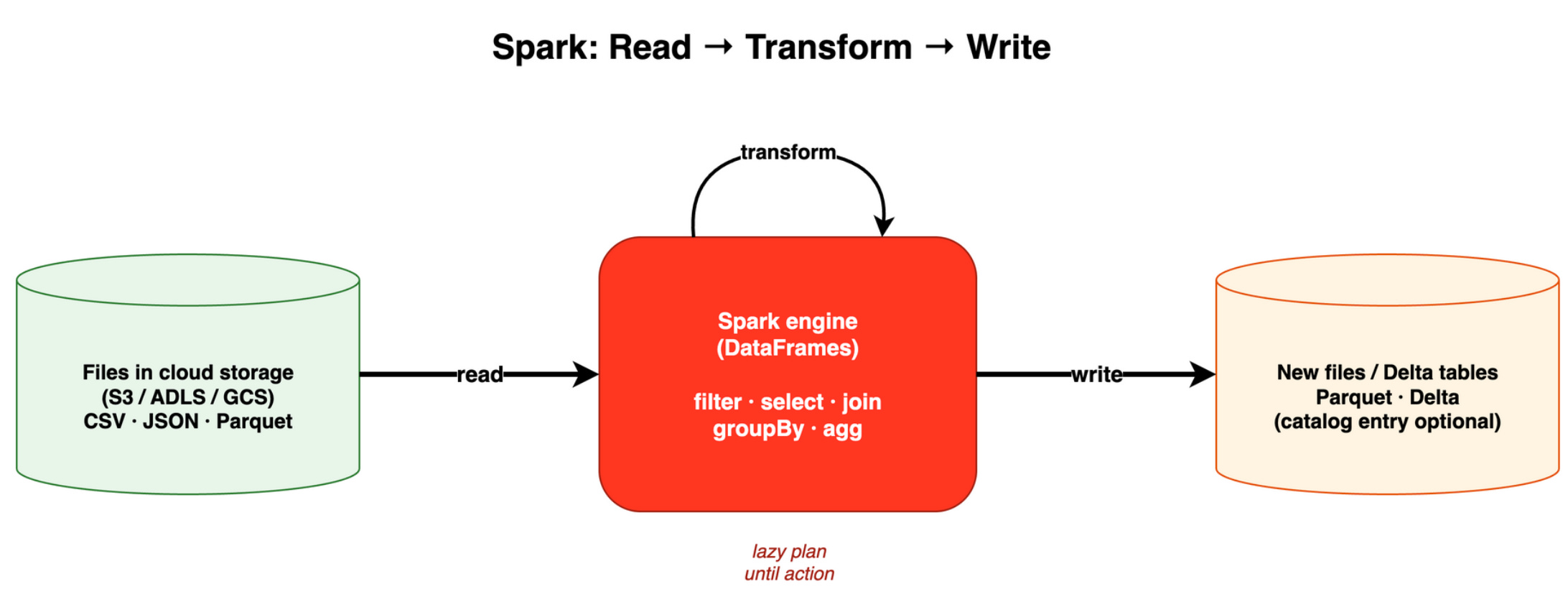
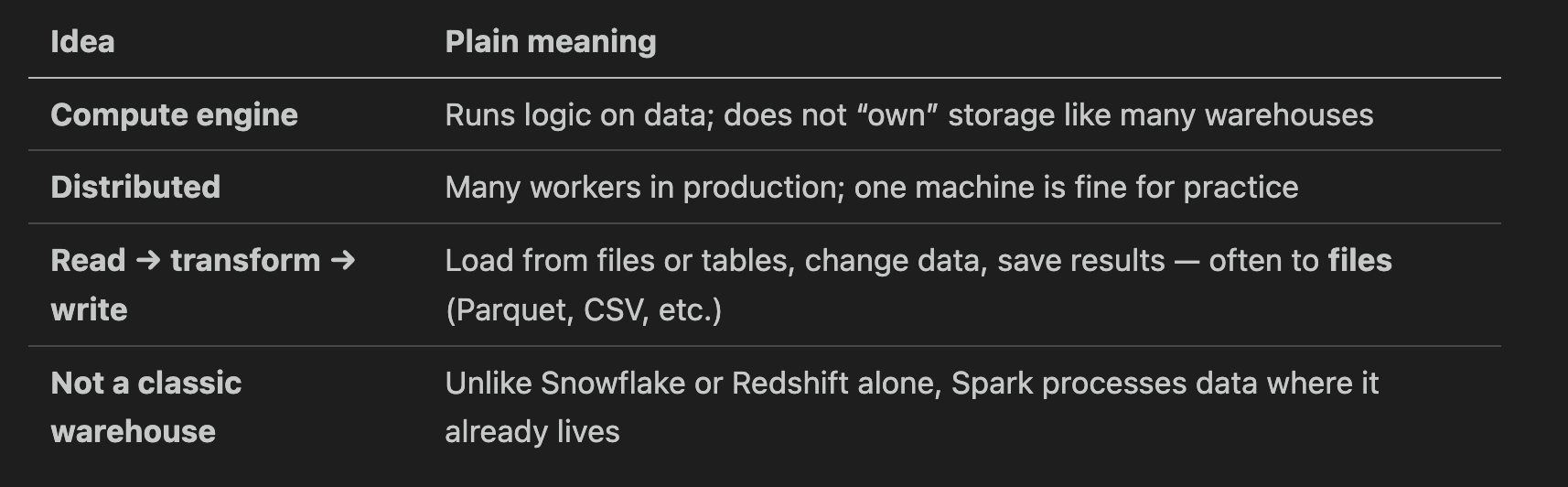
Cloud storage (S3 on AWS, ADLS on Azure, GCS on Google) holds the files. Spark reads them, computes, and writes new files. Storage and compute are separate. That separation is normal in lake and lakehouse setups.
Pandas, but built to scale
If you know pandas, Spark will feel familiar. You work with a DataFrame: rows and columns, like a table. You select columns, filter rows, groupBy for aggregates.
The big difference: pandas runs on one machine. Spark is built to scale out when data does not fit on one box. For small learning datasets, the API still looks similar.
DataFrames and lazy evaluation
A DataFrame is an abstraction over data — often files on disk, sometimes a table registered in a catalog. It is not a promise that all rows sit in RAM at once.
Spark splits work into two kinds of steps:
Transformations —
filter, select, join, groupBy. These build a plan. They do not run the full job yet.Actions —
count, write, show, collect. These trigger execution.
Lazy evaluation means Spark waits until an action. Then it optimizes the plan and runs it once. That is safer and faster on large data than running every step eagerly.
You can write Spark in several languages on the same engine:
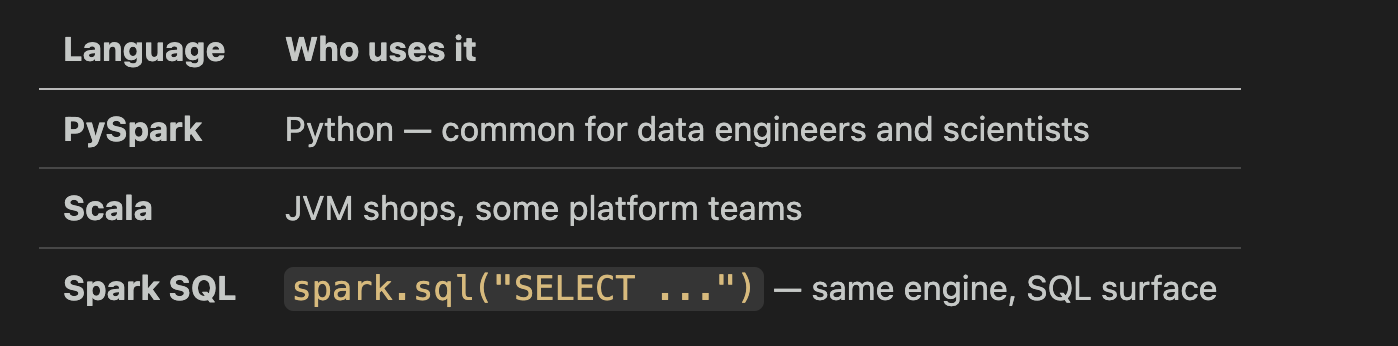
Pick what your team uses. If you come from BI, Spark SQL is a good bridge. If you come from Python scripts, PySpark is natural. You can mix both in one project.
Hive: the phone book, not the warehouse
You will hear Hive and Hive Metastore in older docs and migrations. Keep the idea simple.
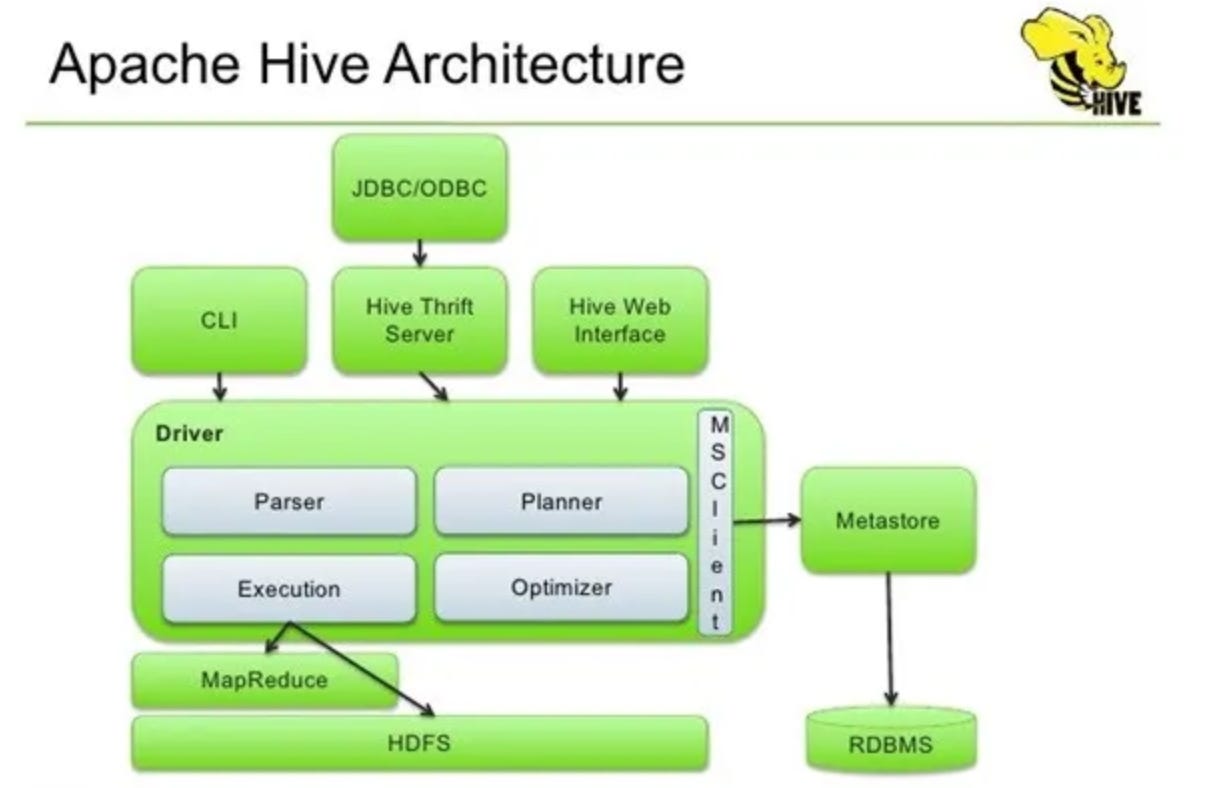
The Hive Metastore is a catalog. It stores metadata: table names, column types, and where files live. It does not store the heavy data files themselves.
An external table is a name in the catalog that points at files you already have, for example in s3://my-bucket/data/. SQL users can run SELECT * FROM sales.orders instead of memorizing paths. If you drop the table definition, the files usually stay. You only removed the catalog entry.
Why this matters for Databricks: BI tools and analysts expect tables. The catalog is the phone book. Spark still reads and writes the underlying files.
Tip: If you only write PySpark and save Parquet paths, you can defer SQL tables until milestone 4 in the roadmap below.
One small story we will repeat
Picture one exercise. No cluster setup here — just the story:
Read a CSV file from a path into a DataFrame.
Select a few columns and filter rows (for example, only one country).
Write the result as Parquet to a new path.
Parquet is a common columnar file format. It is efficient for analytics. Spark and Databricks use it all the time.
We will run the same story again in Databricks in Part 2. Same logic, different UI and managed compute.
Part 1 takeaways:
Spark is a distributed compute engine, not a full warehouse by itself.
DataFrames and lazy evaluation are the core programming model.
Hive metastore (and later Unity Catalog) names files so SQL and BI can find them.
Read → transform → write to files is the basic loop.
Part 2 — Databricks in one sentence, then three layers
The one-sentence definition
Databricks is managed Spark plus a workspace (notebooks, jobs, governance) on AWS, Azure, or GCP.
You do not install and patch Spark workers yourself for daily work. Databricks runs the cluster (or serverless compute), gives you a UI, and adds platform features around the engine.
Over time, Databricks added:
Delta Lake — reliable table format on files
SQL Warehouse — fast SQL for BI and analysts
Unity Catalog — governance, permissions, discovery
Jobs and Lakeflow / DLT — scheduled and declarative pipelines
MLflow — experiments and models
Apps and Genie — applications and UI assistants
Many of these exist because teams wanted warehouse-like SQL, governance, and scheduling on top of Spark and lakes. The platform grew to fill those gaps.
Three layers to hold in your head
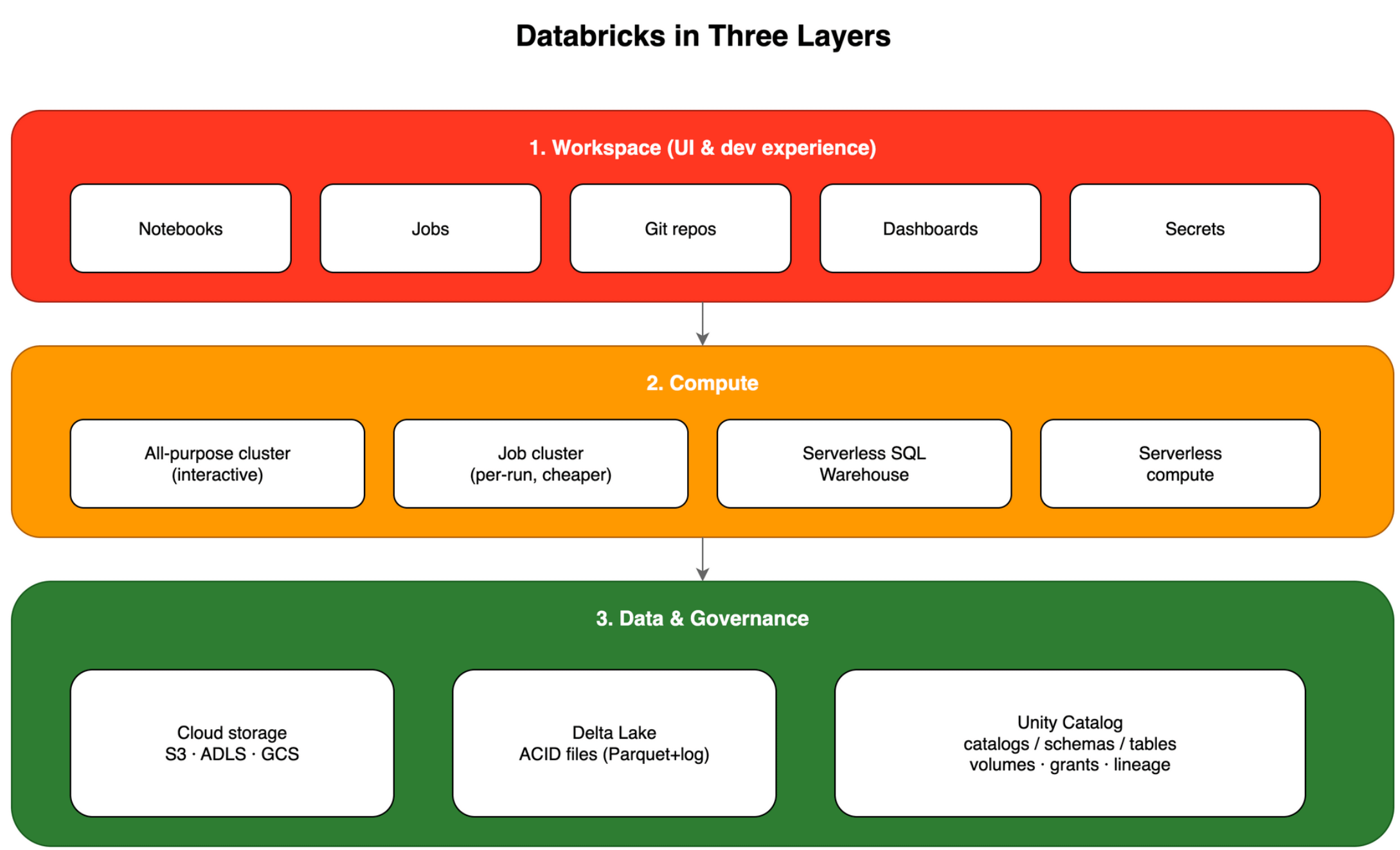
1. Workspace (UI and dev experience)
Think Jupyter in the cloud. Notebooks have cells. You run PySpark, SQL, or Python and see results. The workspace also holds Jobs, links to Git repos (GitHub, Azure DevOps, and others), dashboards, and experiment UI.
Other workspace pieces you will touch later:
Secret scopes — store passwords and tokens without hardcoding them in notebooks
Repos — sync code from Git for review and reuse
2. Compute
You attach a cluster (a group of VMs) or use serverless SQL/compute for some workloads. You pick a size. The platform starts and stops machines. You focus on code, not on SSH into workers.
3. Data and governance
Data files live in your cloud account (S3, ADLS, GCS). Delta Lake adds transactions and safer updates on top of Parquet-like storage. Unity Catalog is the modern catalog: catalogs, schemas, tables, volumes, and permissions.
Databricks is available on AWS, Azure, and GCP. The ideas are the same. Names for storage paths change per cloud.
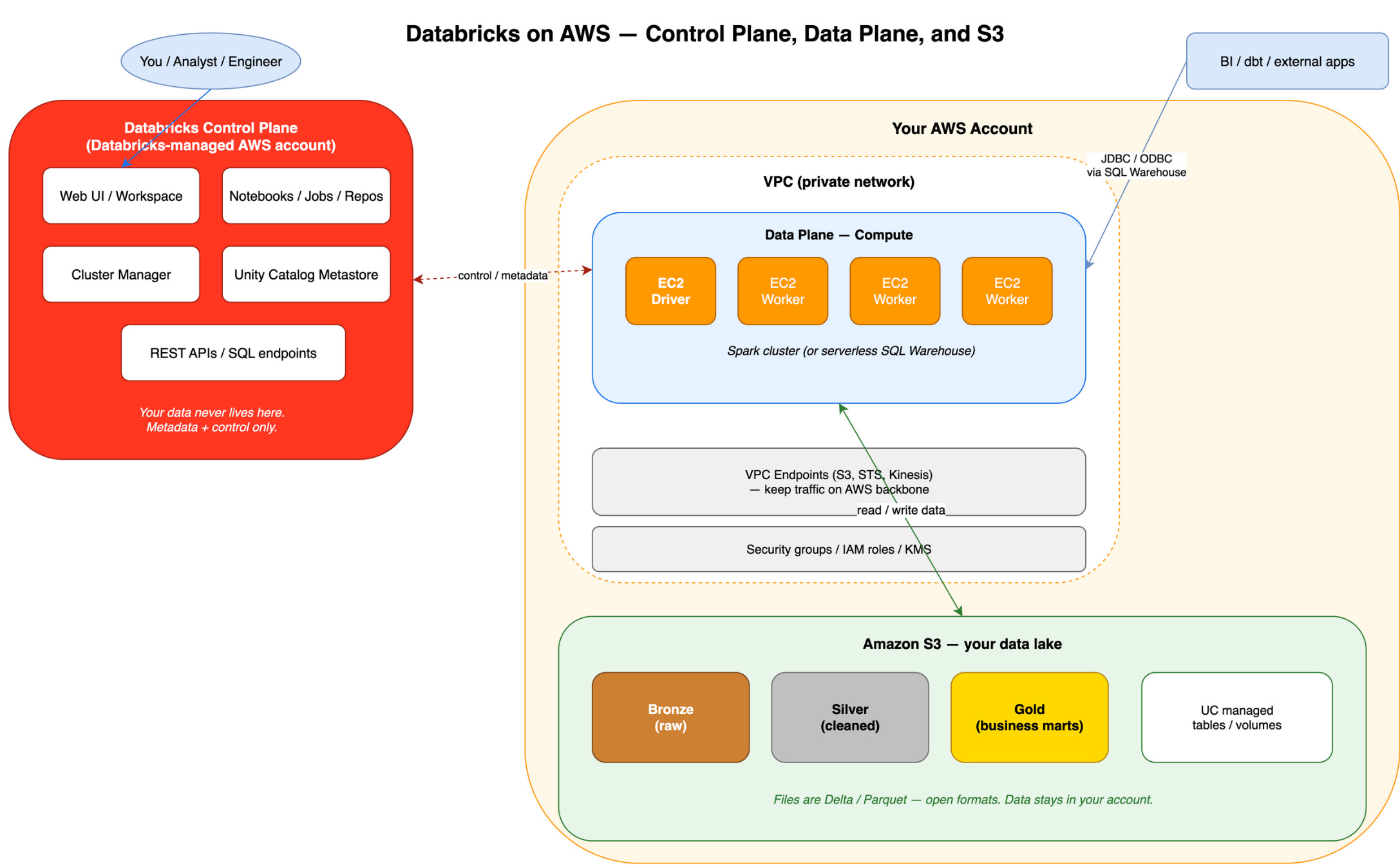
The same exercise in Databricks words
Same story as Part 1, with platform vocabulary:
Create a notebook and attach a cluster.
Read the CSV (for example with
spark.read.csv) into a DataFrame.Transform — select columns, filter rows.
Write Parquet to a path or volume in cloud storage.
Optional: register a table in Unity Catalog so SQL and BI can query by name.
If you want SQL only, you can write the transform as Spark SQL in a cell. Same engine underneath.
Unity Catalog vs Hive — what learners should know today
You may still hear Hive metastore on older workspaces or migration projects. The idea of external tables is the same: catalog entry → files in storage.
For new learning, focus on Unity Catalog:
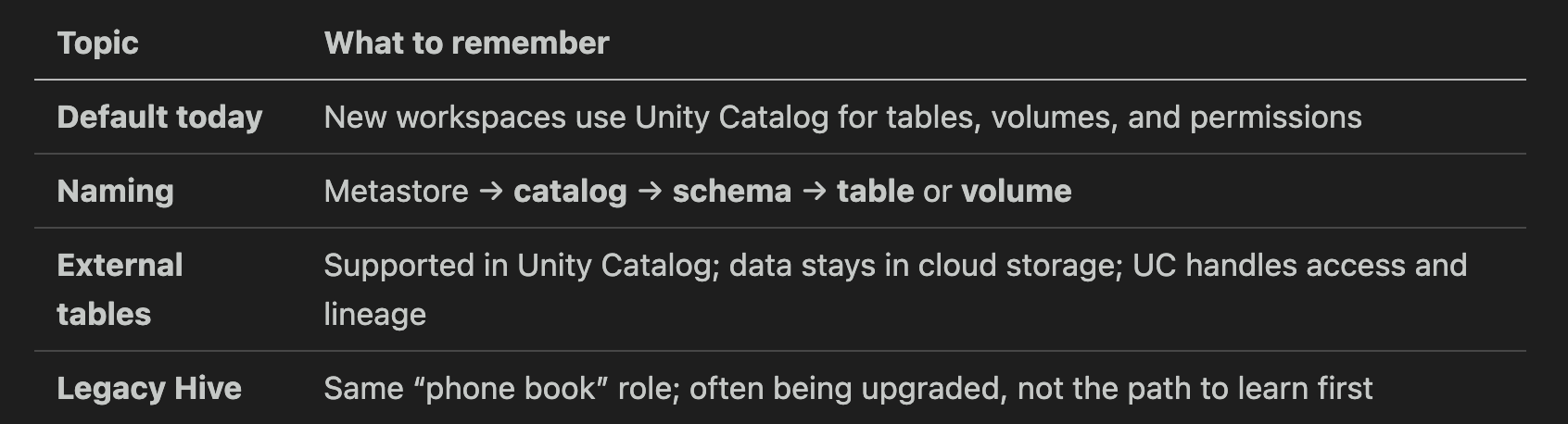
We do not go deep on migration tools (SYNC, UCX, Hive federation) here. When you need that, start with Databricks Unity Catalog upgrade docs.
Part 2 takeaways:
Databricks = managed Spark + workspace + compute + data/governance layer.
Notebooks and clusters are where you start hands-on.
Unity Catalog is the catalog to learn; treat Hive as legacy context.
The read → transform → write loop is unchanged from plain Spark.
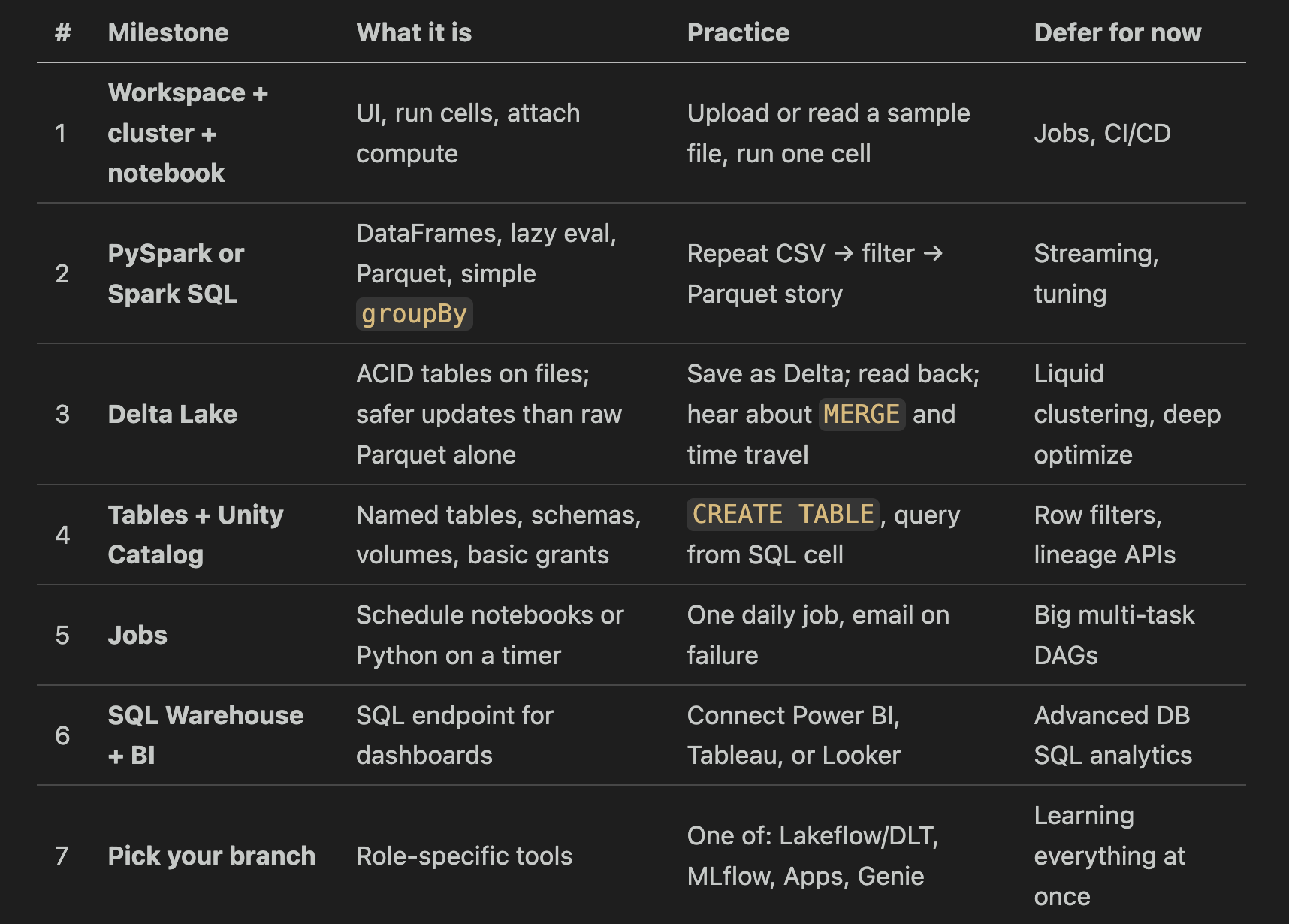
Part 3 — The learning roadmap (seven milestones)
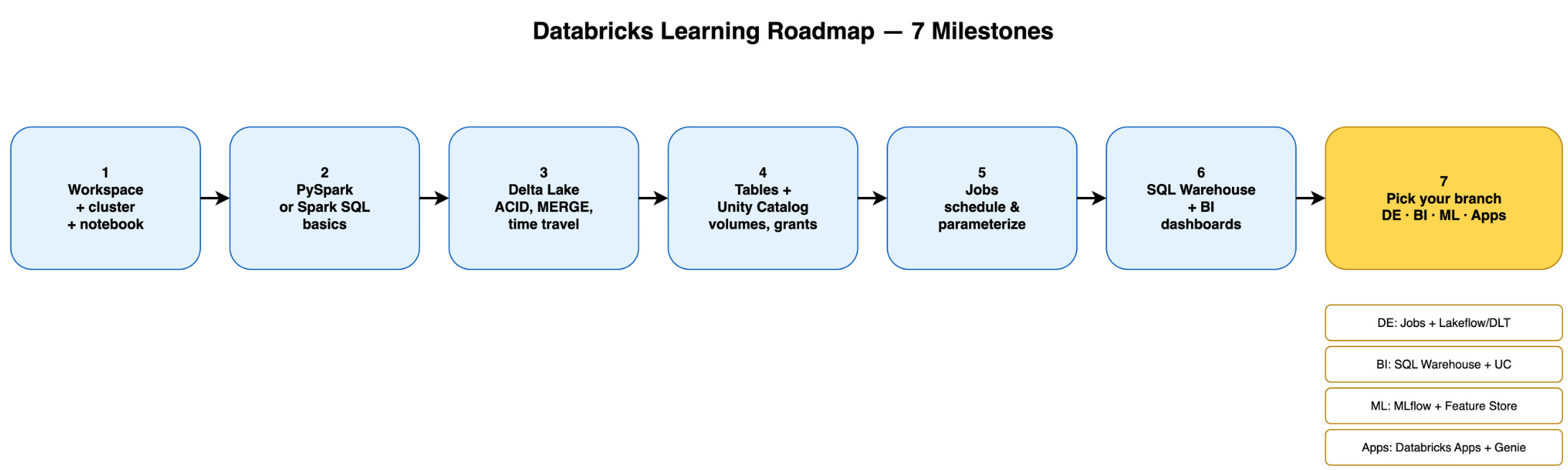
Use this order. Each step builds on the last. Skip ahead only if your job forces it — you can always come back.
Milestone 1 — Workspace, cluster, notebook
Goal: Click around without fear. Create a notebook, start a small cluster, run print("hello") and one read of a sample dataset.
Clusters cost money when they run. Turn them off when you finish. The free trial is enough for this stage.
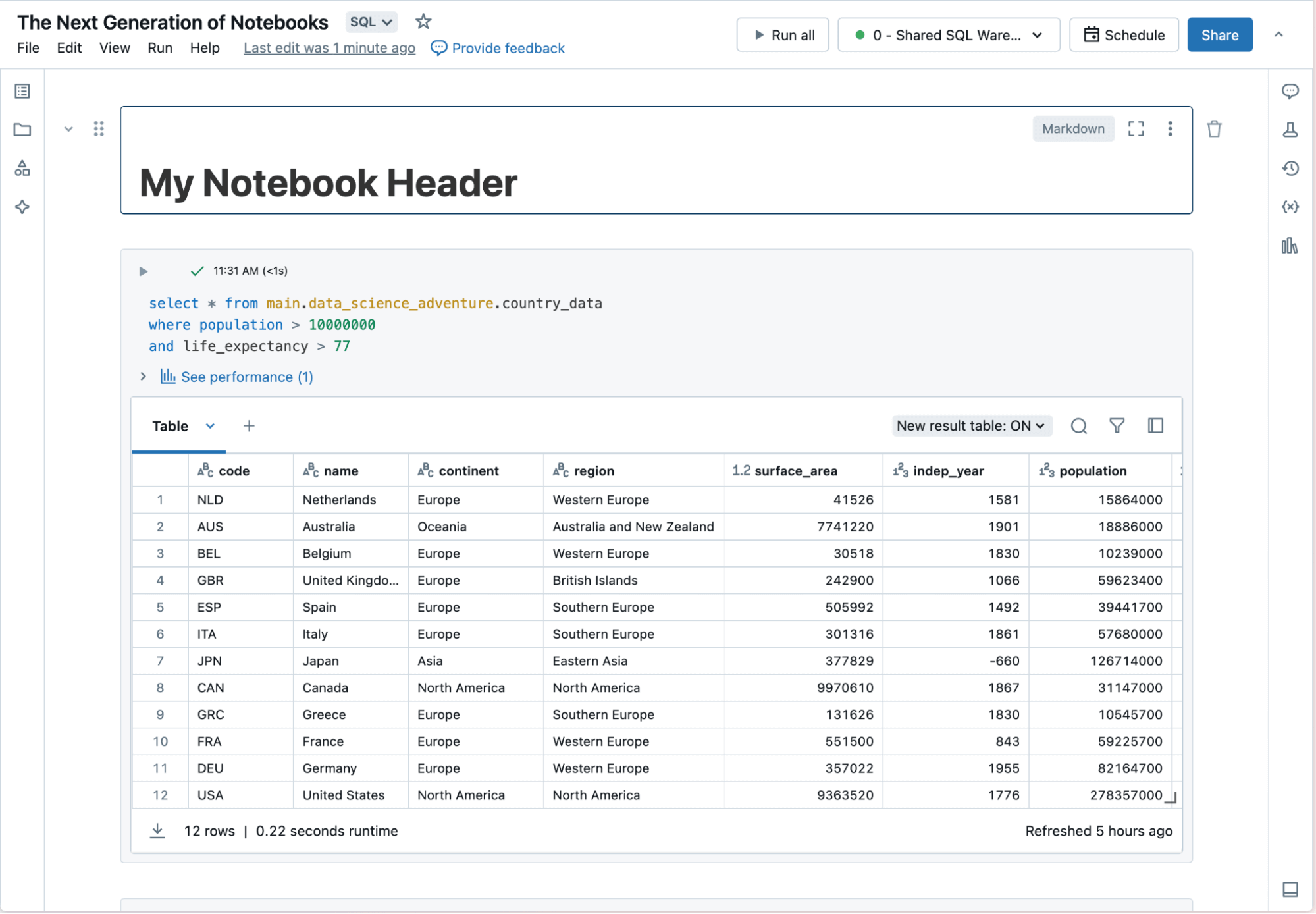
Milestone 2 — PySpark or Spark SQL basics
Goal: Own the read → transform → write loop. Understand that show() is an action and filter() is not.
If Python is shaky, lean on Spark SQL for transforms. If Python is comfortable, PySpark is fine. Same engine.
Milestone 3 — Delta Lake
Lakehouse is a shorthand: data lake (cheap files in cloud storage) plus warehouse-like reliability (transactions, SQL, governance).
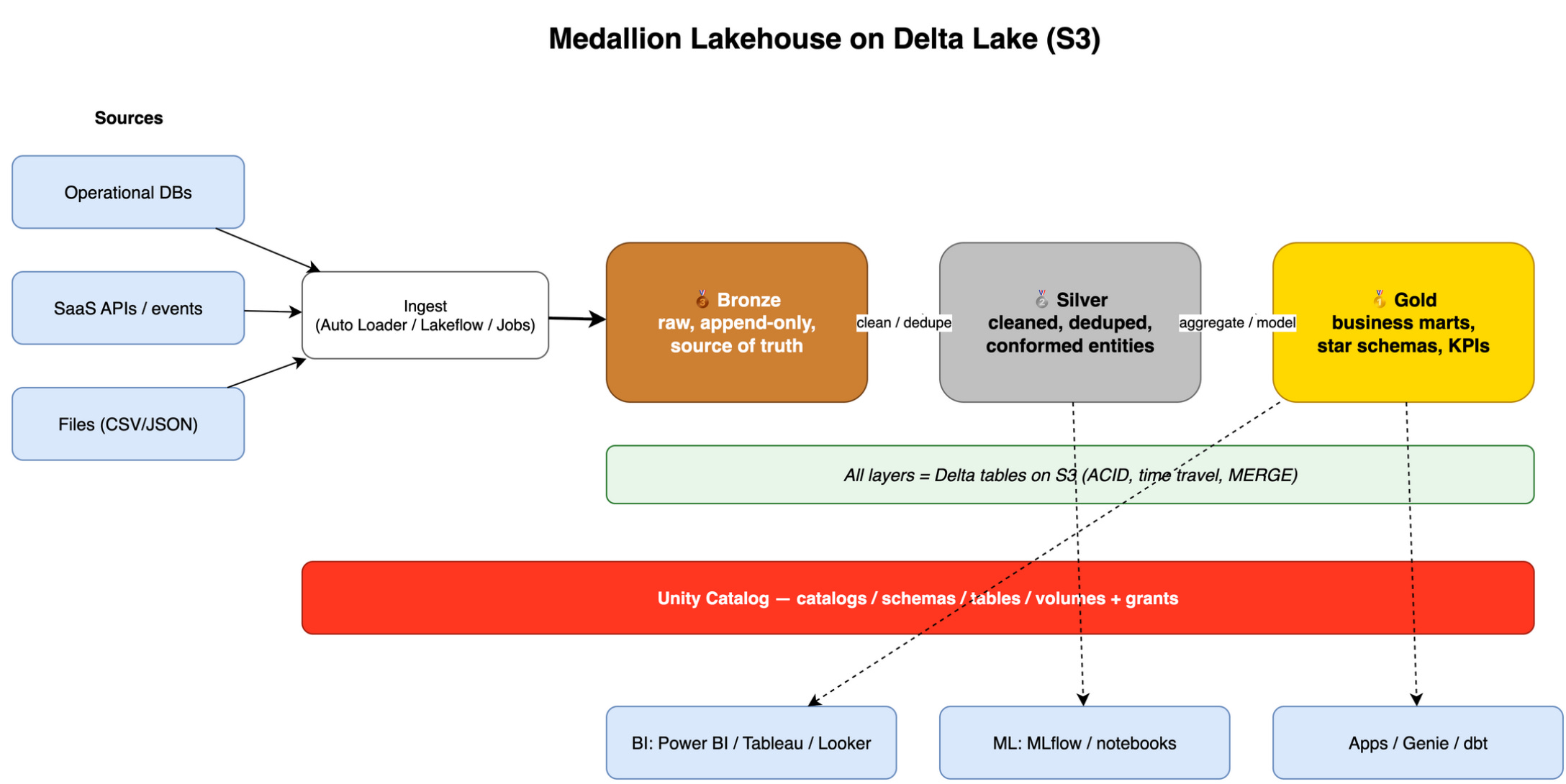
Delta Lake is an open table format on files. It adds:
ACID transactions — fewer broken half-written datasets
Updates and merges —
MERGEfor slowly changing dataTime travel — read older versions for debugging (conceptual first; deep use later)
Think of Delta as “Parquet plus rules for safe concurrent writes.” Databricks invented Delta; it is now widely used beyond Databricks too.
Milestone 4 — Tables and Unity Catalog
Goal: Stop passing raw paths in every notebook. Create catalog.schema.my_table, grant read access to a group, query from SQL Warehouse later.
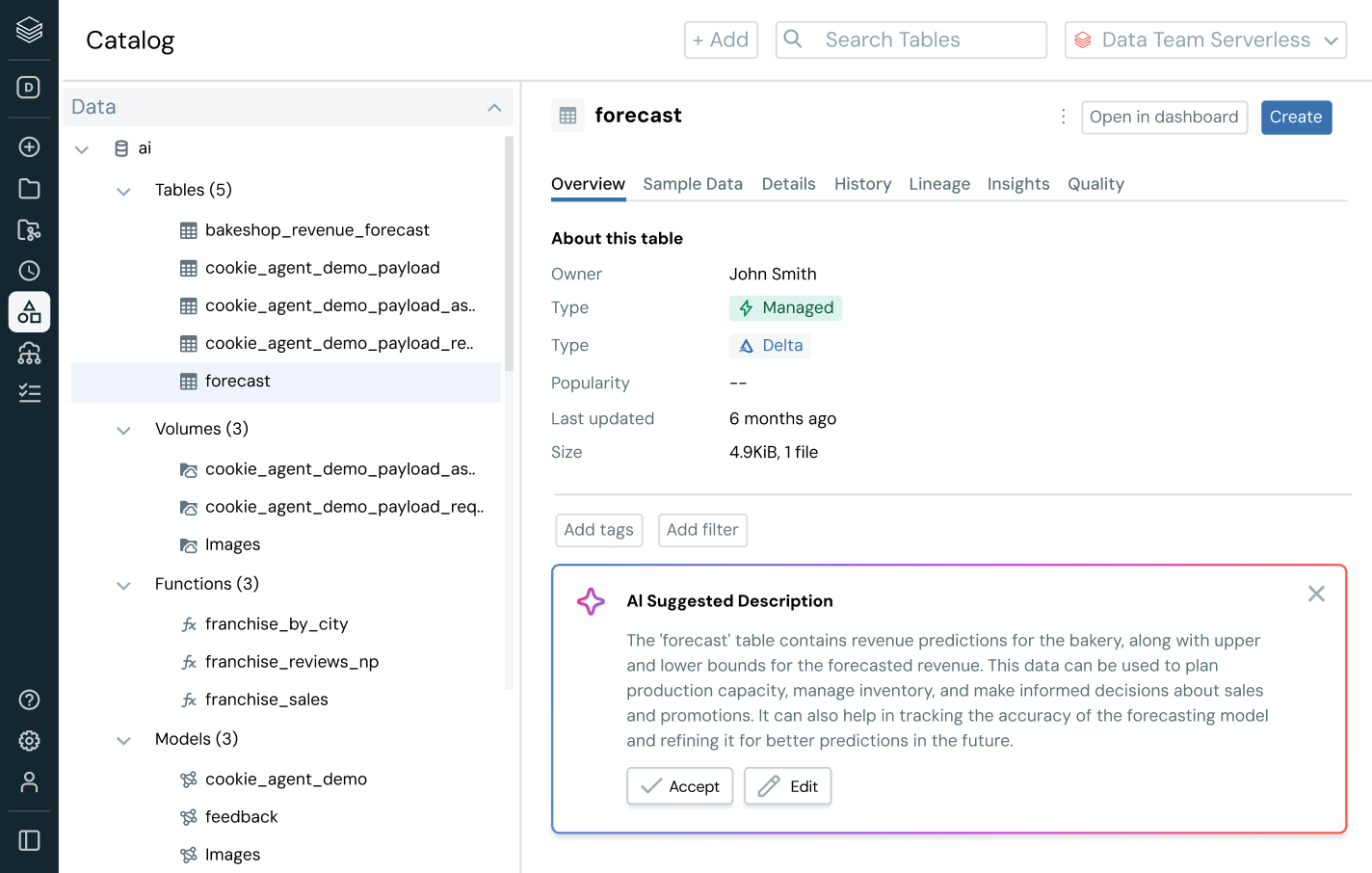
Volumes are a friendly way to manage file paths in UC. External tables still point at cloud storage; UC tracks who may read them.
Milestone 5 — Jobs
Notebooks are great for exploration. Jobs run the same code on a schedule or trigger. Parameters let you pass dates or environments.
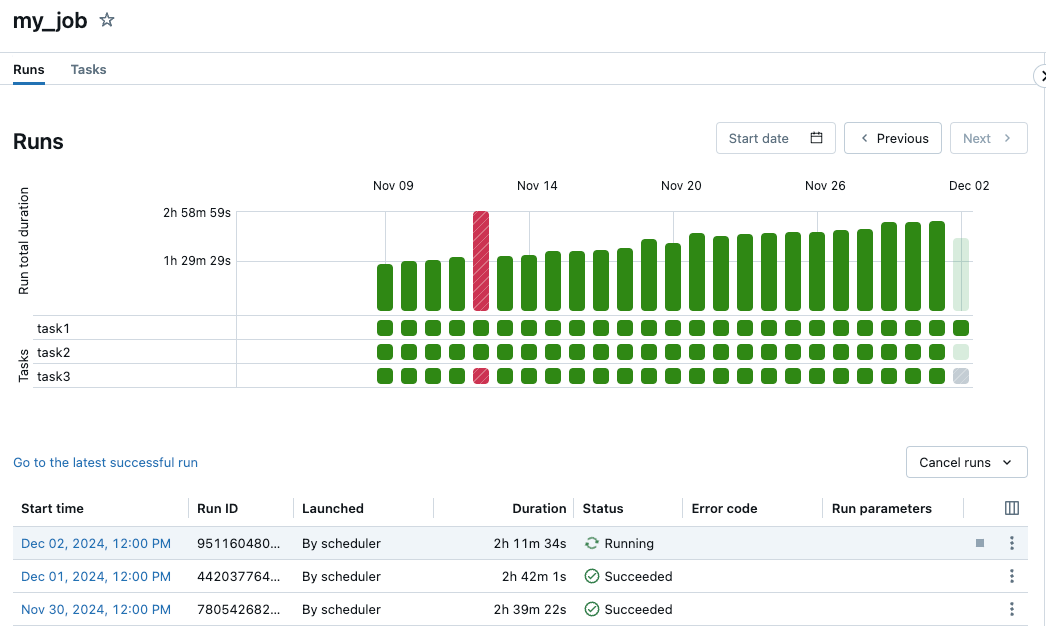
This is the Databricks answer to “run my ETL every night.” It pairs with milestone 2–4 code.
Milestone 6 — SQL Warehouse and BI
Analysts and BI tools want SQL and stable endpoints. SQL Warehouse (serverless SQL compute) serves that need without you sizing a Spark cluster for every dashboard.
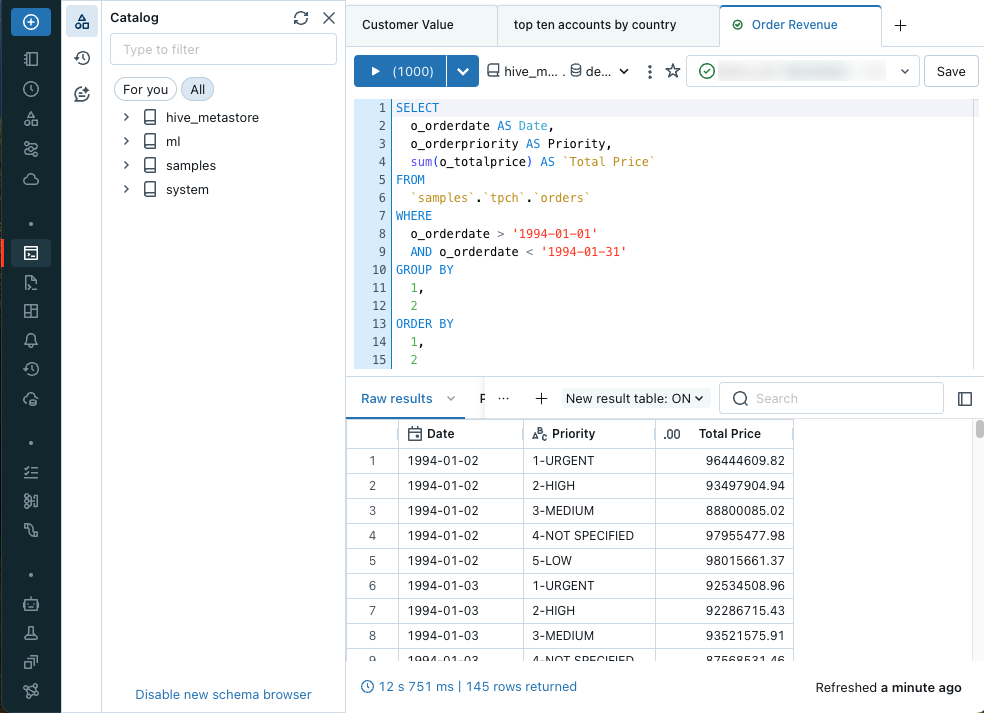
Connect your BI tool, point at Unity Catalog tables, build reports.
Milestone 7 — Pick your Role
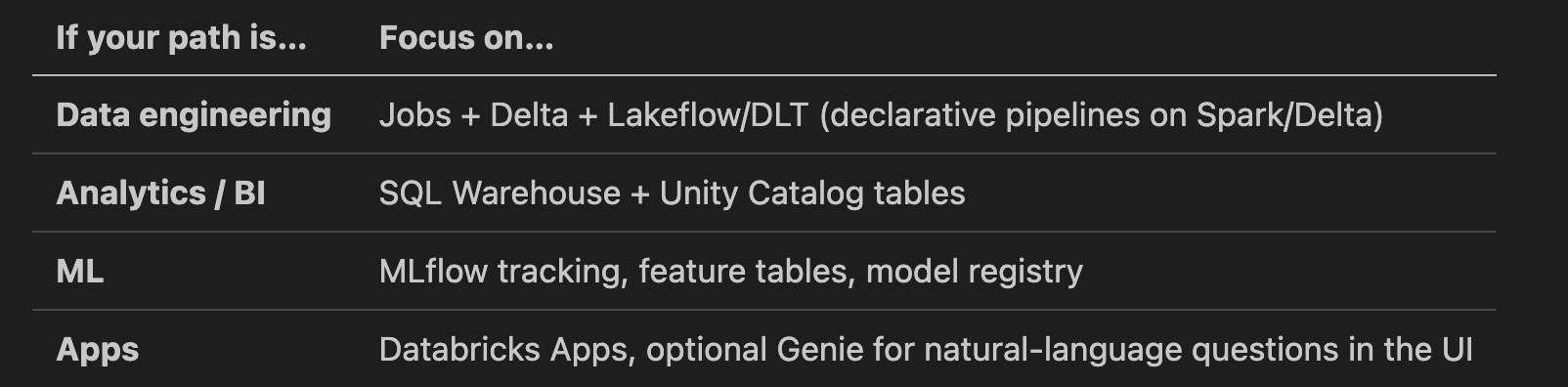
Lakeflow / DLT (you may still see Delta Live Tables, DLT): pipelines defined as tables and expectations, less boilerplate than hand-rolled job chains. Learn after Jobs make sense.
MLflow tracks experiments, parameters, and models. Genie is a UI assistant — helpful, not a prerequisite.
Genie, Apps, AI/BI: nice extras. They are not step zero.
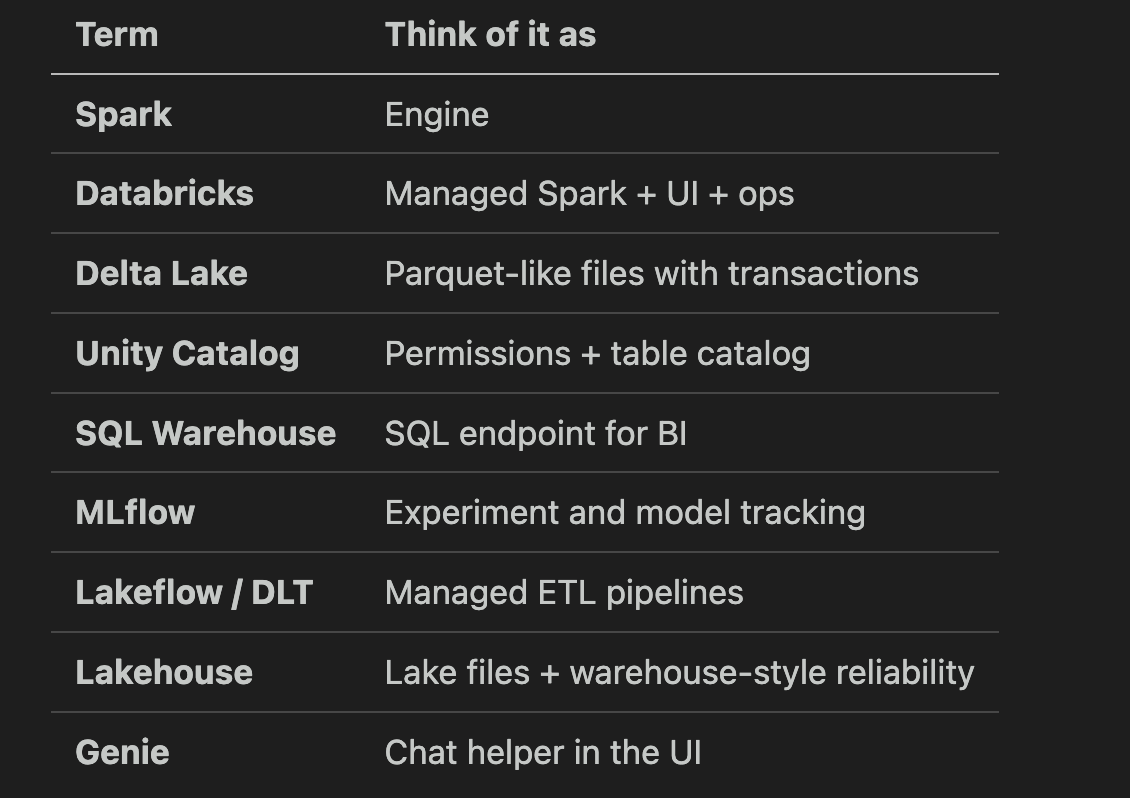
When you hear a buzzword, think this
Part 3 takeaways:
Seven milestones: notebook → Spark → Delta → UC tables → Jobs → SQL Warehouse → role branch.
Lakehouse = lake storage + Delta + SQL + governance.
Do not study every product name in week one.
Part 4 — How this fits the wider data world
You might be learning Databricks while also reading about Snowflake, dbt, and Airflow. Here is a simple alignment.
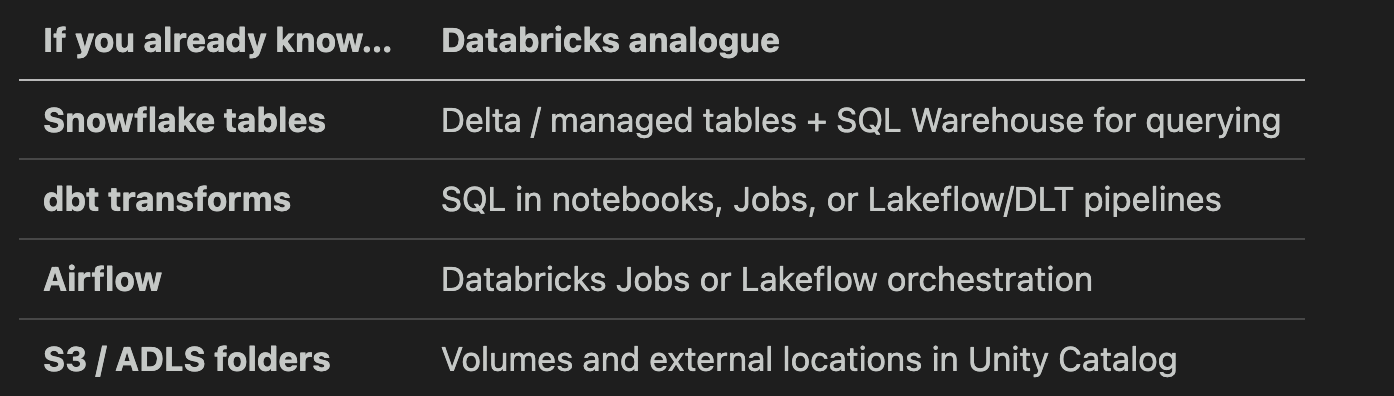
None of these replace the others in every company. Many teams run Snowflake and Databricks for different workloads. Many use dbt with a warehouse and Spark for heavy ingestion. The map helps you talk to teammates, not pick one religion.
Related Surfalytics posts:
Your First Data Engineering Project — Snowflake, Fivetran, dbt path without Spark
Data Engineering System Design Cheat Sheet — where lakehouse fits in a full architecture
Practical Data Modelling — star schemas and SCDs when your tables are ready for analytics design
Part 5 — Key takeaways and what to do next
Spark first — compute engine, read → transform → write, DataFrames, lazy evaluation.
Databricks second — managed Spark, notebooks, clusters, cloud storage under your account.
Delta third — reliable tables on files; foundation of the lakehouse story.
Unity Catalog fourth — names, permissions, and volumes; learn this instead of legacy Hive paths.
Jobs fifth — move repeatable notebooks into scheduled work.
SQL Warehouse sixth — serve BI and analysts who live in SQL.
Branch seventh — DLT, MLflow, or Apps based on role; ignore the rest until needed.
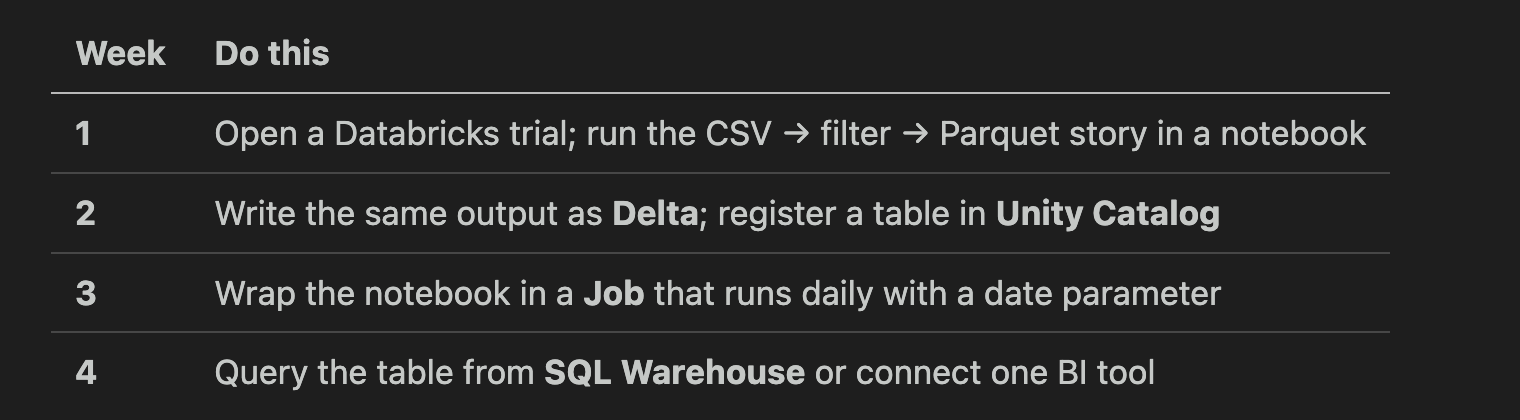
A simple four-week practice plan (no tutorial in this post)
Appendix
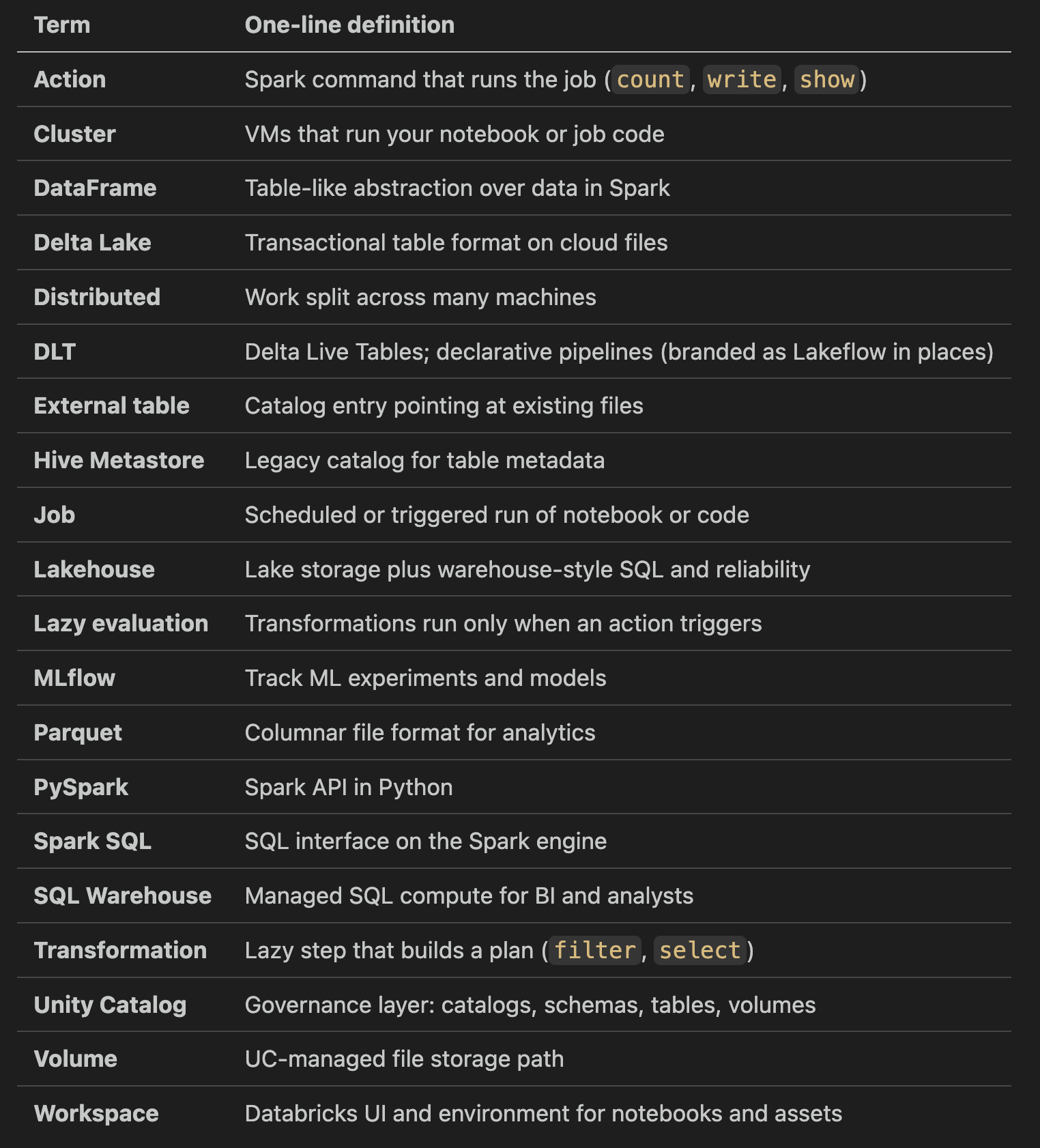
Glossary (quick reference)
Official docs (starting points)
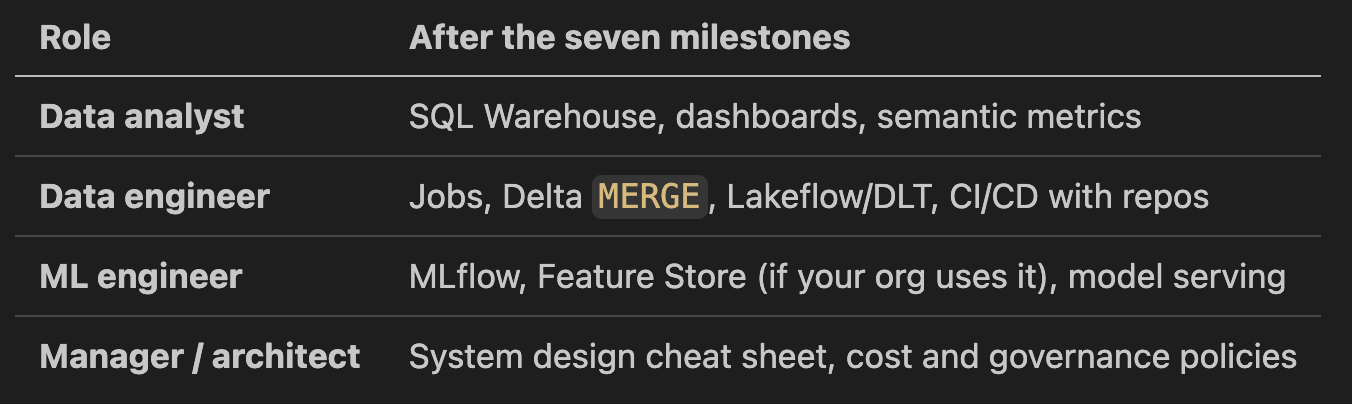
What to learn next by role
Free Databricks learning resources and workshops
You can go far on free tiers alone. Group these by what they give you.
Free hands-on environments
Databricks Community Edition — free single-node cluster, notebooks, and a small workspace. No credit card. Best place to do milestones 1–3.
Databricks Free Trial (AWS/Azure/GCP) — 14 days on your cloud account. Needed for SQL Warehouse, Unity Catalog, and Jobs at full strength.
Databricks Tutorials — Databricks tutorials.
Delta Lake quickstart on your laptop —
pip install delta-sparkand run Delta locally, no cloud needed.
Free self-paced courses (Databricks Academy)
Lakehouse Fundamentals — 4 short modules + free badge. Best starting point after this post.
Generative AI Fundamentals — concepts + free badge.
Data Analyst Learning Plan (free path inside Academy) — SQL Warehouse and dashboards focus.
Get Started with Databricks for Data Engineering — free intro path for the DE branch.
Apache Spark Programming with Databricks — free self-paced version inside Academy.
Free workshops and live events
Databricks Events page — filter by Virtual Workshop and Free. New cohorts every week (Lakehouse for DE, GenAI, SQL).
Data + AI Summit recordings — full keynote and breakout videos, free on YouTube after each summit.
Databricks YouTube channel — product deep-dives, “What’s new,” and tutorial playlists.
Databricks Community — forum, ask questions, find recordings of community meetups.
Free open-source learning (engine and formats)
Unity Catalog OSS — the open-sourced catalog you can run locally.
Free blogs and newsletters worth the inbox space
Databricks Blog — product, engineering, and customer stories.
Delta Lake Blog — format-level updates, useful before deep Delta work.
Databricks Solution Accelerators — full reference projects (retail, finance, healthcare) you can clone for free.
Suggested order on a budget: Community Edition + Lakehouse Fundamentals badge → run two dbdemos → Free Trial for one weekend to touch SQL Warehouse, Unity Catalog, and Jobs.