
Just Enough Python for Data Roles 🐍
Python is important, but don't let it overwhelm you. Focus on problem-solving first—especially in the early stages of your career.

The Python Challenge
Python is the number one language for data jobs. Whether you’re aiming for data engineering, data analytics, machine learning, or generative AI - Python is everywhere.
But here’s the thing: Python is big. Really big. And complicated.
Where do you even start?
If you’re new to Python, the amount of information can feel overwhelming. If you’re experienced, you might wonder: “Do I really need to know everything?”
The answer is no. You don’t need to master everything. You need just enough Python for data roles.
This guide will show you what to learn, how to learn it (hint: books, not just videos), and what you can skip. I’ll share my personal learning method that helped me build a 15+ year career in data engineering.
Let’s start with something important.
“The single most important skill for a computer scientist is problem solving. Problem solving means the ability to formulate problems, think creatively about solutions, and express a solution clearly and accurately.” - Allen B. Downey
This applies to data roles too. You might work as a data engineer, data analyst, or data scientist. But always focus on the problem first. The problem should come from the business. We shouldn’t just write code because we like it. We need to solve real business problems and add value.
Keep that in mind as you learn Python. The language is a tool. The problem-solving mindset is what matters.
🐍 Why Python? (The Reality Check)
Python’s Dominance
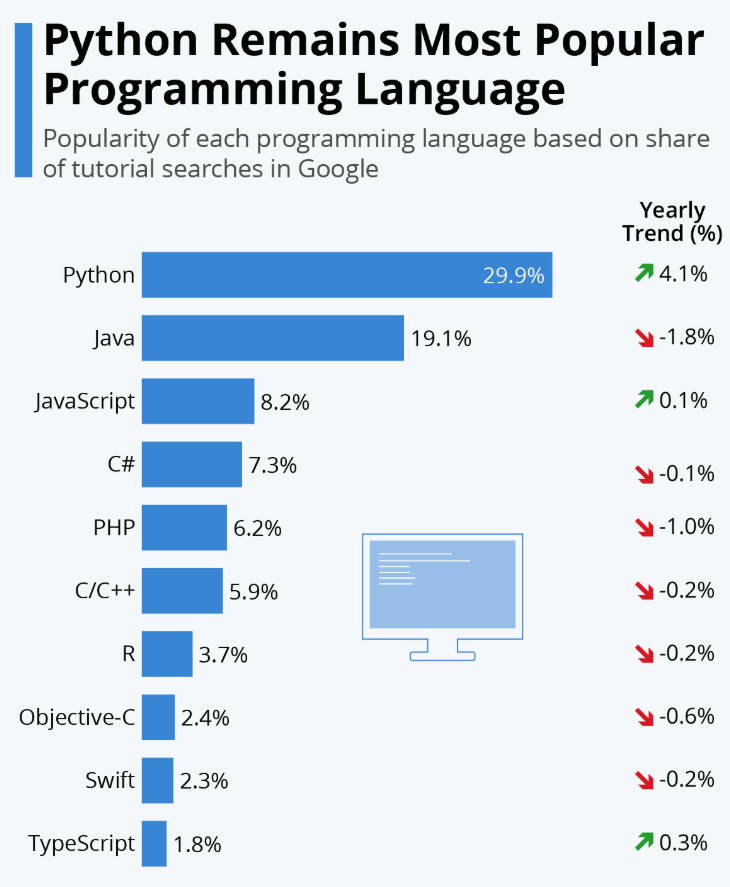
Python is everywhere in data. It’s the most popular language for data jobs. You can use it for:
Data analytics and exploration
Data engineering pipelines
Machine learning models
Generative AI applications
Cloud infrastructure and automation
The community is huge. There are thousands of packages and libraries ready to use. And with AI assistants like Cursor and Copilot, you can contribute to Python codebases even with basic knowledge.
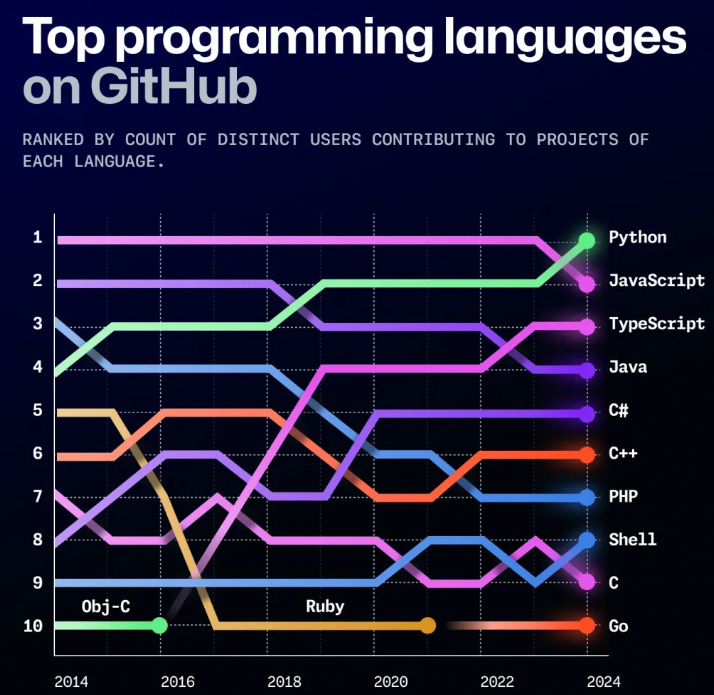
When Python Isn’t Enough
Python has limits. It’s not always the best choice for:
Production applications at massive scale (millions of users)
Performance-critical systems
Some real-time applications
But for data roles? Python is the standard. It’s what you need.
Python Alternatives (Quick Reality Check)
You might hear about other languages:
Scala: Popular for Spark and Hadoop. But you can use PySpark instead.
R: Some legacy code exists. But Python is the modern choice.
Rust/C++: High performance, but smaller data community.
Bottom line: Focus on Python first. Learn alternatives only if your company uses them. With AI assistants, you can adapt to other languages when needed.
📚 The Learning Method: Why Books Beat Tutorials
Here’s my personal take: Books are better than video tutorials for learning Python.
The Problem with Video Tutorials
Video tutorials are:
Too fast-paced. Not enough time to digest concepts.
Hard to return to. Finding that one explanation you need is frustrating.
Limited practice. You watch, but don’t always do.
Often skip fundamentals. They rush to the “cool stuff.”
Why Books Work Better
Books let you:
Learn at your own pace. Read, pause, re-read. No one is rushing you.
Practice with exercises. Hands-on learning beats passive watching.
Create notes and summaries. Active learning helps you remember.
Return to concepts. Can’t remember something? Flip back a few pages.
Here’s a technique that helped me: Write down Python scripts and learn them by heart. Try to understand what each line means. Then review them during your commute or breaks. This repetition builds understanding.
Recommended Books
I’ve read many Python books. Here are two I highly recommend:
1. Think Python (Free!)
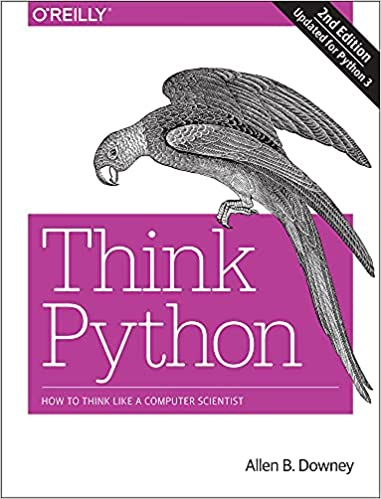
Why it’s great: Simple, clear, perfect starting point.
Where to get it: Available for free online. Just search “Think Python free download.”
Best for: Complete beginners who want a solid foundation.
Link: https://greenteapress.com/thinkpython2/thinkpython2.pdf
2. Python Crash Course
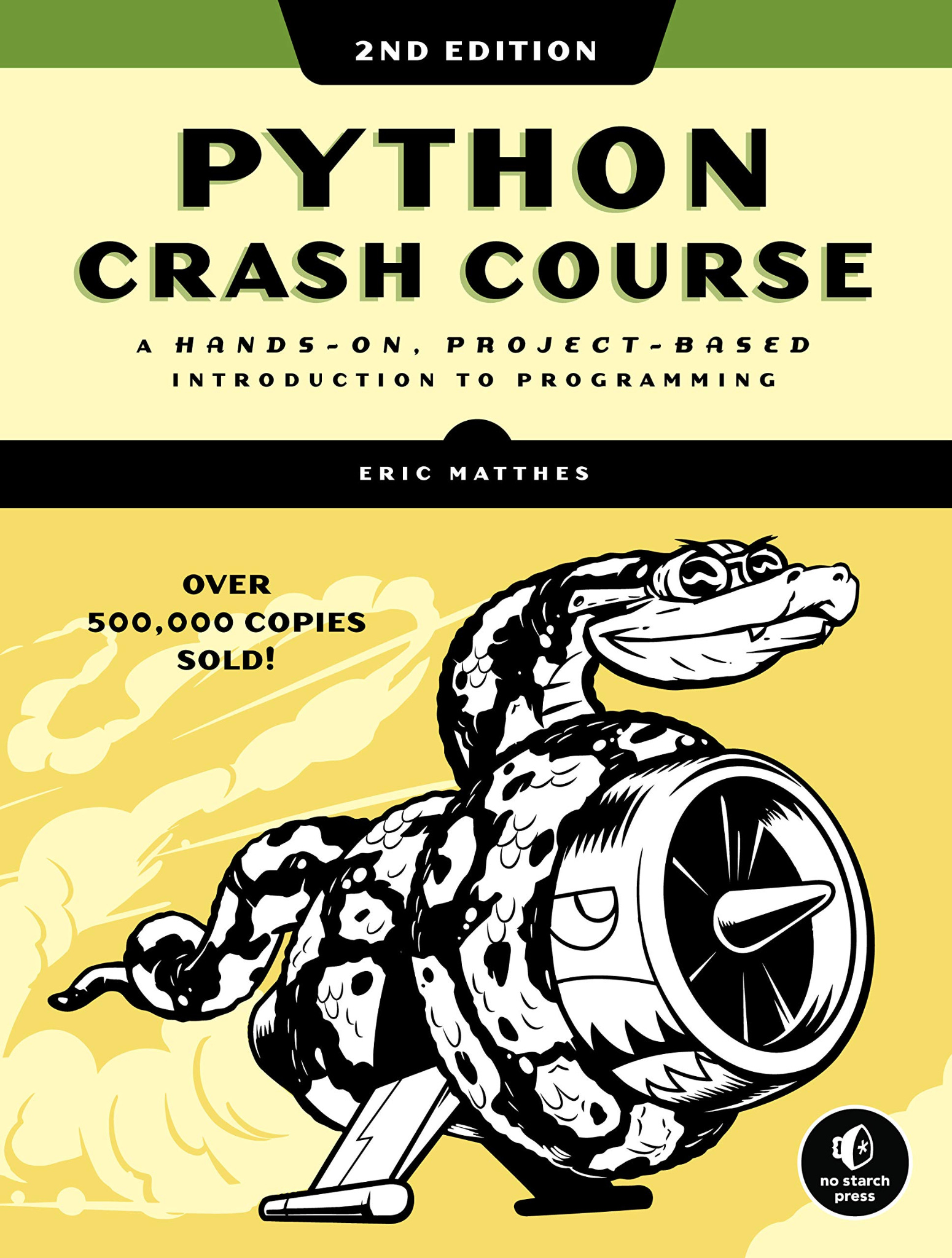
Why it’s great: Two-part structure that’s brilliant.
Part 1: Fundamentals. Functions, classes, variables, data types. Everything you need to know.
Part 2: Real-world projects. You build a website with Django, create a game, build a data analytics solution. You apply what you learned.
Best for: Learning fundamentals AND seeing how to build complete applications.
Unique value: Most books teach concepts. This one shows you how to use them end-to-end.
The “Three Books Rule”
A friend gave me great advice: “If you want to learn something, read at least three books on that topic.”
Don’t waste time on endless video tutorials. Go to Amazon, check the best-reviewed Python books, and get them. Start with Think Python or Python Crash Course. Then find a third book that covers areas you want to dive deeper into.
🎯 Core Python Fundamentals: The 5 Essentials
You don’t need to learn everything about Python. You need to master these five things first.
1. Variables & Data Types
What: The basic building blocks.
Types you need to know:
int- whole numbers (1, 2, 100)float- decimal numbers (3.14, 2.5)string- text (”hello”, “data”)boolean- True or FalseNone- represents nothing
Why it matters: Everything in Python is built on these. You can’t skip this.
Practice: Create variables. Convert between types. Understand what each type means.
2. Data Structures
What: How you organize and store data.
The four you need:
Lists: Ordered collections you can change.
[1, 2, 3]Tuples: Ordered collections you can’t change.
(1, 2, 3)Dictionaries: Key-value pairs.
{”name”: “John”, “age”: 30}- Most important for data workSets: Collections of unique elements.
{1, 2, 3}
Why it matters: This is how you work with data. Lists and dictionaries are everywhere in data roles.
Practice: Create each type. Add items, remove items, access values.
3. Control Flow
What: How you make decisions and repeat actions.
The basics:
if/else statements: Decision making. “If this is true, do that.”
for loops: Repeat something for each item in a list.
while loops: Repeat something while a condition is true.
Why it matters: This is the logic of your code. Without this, you can’t automate anything.
Practice: Write if statements. Loop through lists. Combine conditions.
4. Functions
What: Reusable blocks of code.
Key concepts:
defkeyword - how you create functionsParameters and arguments - passing data into functions
Return values - getting results back
Lambda functions - quick one-liners
Why it matters: Functions let you write code once and use it many times. Essential for any real project.
Practice: Write simple functions. Pass data in. Get results out. Use functions in other functions.
5. Modules & Packages + Virtual Environments
What: Using other people’s code and managing dependencies.
Key concepts:
importstatements - using existing codeCreating modules - organizing your own code
Virtual environments - isolating dependencies (avoiding “dependency hell”)
Why it matters: You’ll use libraries like pandas, requests, and boto3. You need to know how to import them. Virtual environments are critical for professional development.
Practice: Import standard library modules. Install packages with pip. Create a virtual environment.
Nice to Have (But Not Critical Yet)
List Comprehensions: Elegant one-liners. Useful for interviews, but not essential for daily work.
Exception Handling: try/except/finally blocks. Good practice, but you can learn this later.
Learning strategy: Master the 5 essentials first. If you don’t understand something, take a break and revisit it. Don’t rush. Understanding beats speed.
📊 Key Topics for Data Roles
Now that you have the fundamentals, here are the seven areas that matter for data roles:
Data Manipulation - Working with data
Data Processing - Processing large datasets
Database Connectivity - Connecting to databases
Data Validation & Quality - Ensuring data is correct
Cloud & Infrastructure - Working with cloud services
Data Formats & Serialization - Reading and writing different file types
Advanced Concepts - Optional but valuable
Let’s dive into each one.
📈 1. Data Manipulation
Pandas (The Workhorse)
What it is: Pandas lets you work with DataFrames and Series. Think of it as Excel or SQL tables, but in Python.
It might be better to use DuckDB instead of Pandas ;)
🦆🦆🦆🦆🦆🦆🦆🦆🦆🦆🦆🦆🦆🦆🦆🦆🦆🦆🦆🦆🦆
Key operations you’ll use:
read_csv()- Reading CSV filesgroupby()- Grouping and aggregating datamerge()- Joining data (like SQL JOINs)pivot_table()- Reshaping data
Use cases: Data analysis, exploration, ad-hoc requests.
Best for: Data Analysts and Data Scientists.
Important limitation: Pandas is great for notebooks and local analysis. It’s not ideal for production pipelines. Data engineers often use SQL or Spark instead.
Reality check: If you’re comfortable with SQL, you might use DuckDB and solve many problems without deep Pandas knowledge. But if your organization uses Python, you need to understand their code.
NumPy
What it is: Arrays and mathematical operations.
Why it matters: Pandas is built on NumPy. Many ML libraries use it too.
Use cases: Mathematical computations, working with arrays.
Polars
What it is: A faster alternative to Pandas.
When to use it: If Pandas is too slow for your dataset.
Reality: Most people start with Pandas. Learn Polars if you hit performance issues.
PyArrow
What it is: Support for columnar data formats.
Why it matters: Efficient data storage and transfer, especially for Parquet files.
⚙️ 2. Data Processing
PySpark (The Big Data Tool)
What it is: Distributed data processing. Process data across multiple machines.
Key concepts:
RDDs (Resilient Distributed Datasets)
DataFrames
Transformations and actions
Platforms: Apache Spark, Databricks
Reality check: Many companies use Spark SQL instead of PySpark. You might not need deep PySpark knowledge if SQL works for your use case.
When you need it: If your company uses Spark and you need to contribute Python code.
Dask
What it is: Parallel computing for larger-than-memory datasets.
Reality: Less commonly used. Good to know it exists.
When: If your organization uses it.
Apache Airflow (The Orchestrator)
What it is: A framework for scheduling and running data pipelines.
Key concepts:
DAGs (Directed Acyclic Graphs) - your pipeline structure
Operators - tasks in your pipeline
Tasks - individual steps
Why it’s critical: Extremely popular in data engineering. You’ll likely encounter it.
Python knowledge needed:
You don’t need to be a Python expert
You need to understand code (read functions, understand variables)
Often template-based (copy, paste, modify parameters)
Covered in: Surfalytics Module 4 of our course (if you’re following along).
🗄️ 3. Database Connectivity
When You Need It
You’ll need database connectivity when:
Extracting data from databases
Writing data to databases
Building end-to-end data solutions
Key Libraries
SQLAlchemy: ORM (Object-Relational Mapping). Works with many databases.
psycopg2: PostgreSQL adapter. Direct connection to PostgreSQL.
pymongo: MongoDB driver. For NoSQL databases.
pyodbc: ODBC connections. Works with various databases.
The Reality
Alternative tools exist: Fivetran, Airbyte (no-code/low-code tools). You might not need Python for simple extractions.
When to use Python:
Custom extraction logic
No connector available
Contributing to the existing Python codebase
Practice: We’ll have examples with PostgreSQL in Module 2.
✅ 4. Data Validation & Quality
Why It Matters
Data quality is critical. Bad data leads to bad decisions. Production systems need validation.
Key Tools
Pydantic: Data validation using Python type hints. Great for API data.
Great Expectations: Data quality testing framework. Comprehensive validation.
Pandera: DataFrame validation. Check your pandas DataFrames.
pytest/unittest: Unit testing. Test your functions.
DBX: Databricks framework for data quality.
Advanced Concept: Test-Driven Development (TDD)
What it is: Write tests before writing functions.
Why it helps: Ensures your code works correctly from the start.
When: More advanced use case. Shows professional maturity.
☁️ 5. Cloud & Infrastructure
AWS (boto3)
What it is: AWS SDK for Python. The official way to interact with AWS services.
Use cases:
S3 (storage)
Lambda (serverless functions)
Glue (ETL jobs)
Triggering jobs
Creating resources
Why it matters: AWS is the most popular cloud platform.
Google Cloud
google-cloud-storage: GCP integration. Similar patterns to AWS.
Azure
azure-storage-blob: Azure integration. Similar patterns to other clouds.
Docker
What it is: Containerization. Package your application with all dependencies.
Why it matters: Ensures your code runs the same way everywhere.
Connection: Often used with Python applications in production.
API Requests (Critical!)
requests library: Connecting to REST APIs.
Why it’s critical: Many data sources come from APIs. You’ll use this a lot.
Typical workflow:
Connect to API endpoint
Get JSON data
Process and manipulate data
Save to database or files
Connection: Often requires database connectivity libraries too. It all connects.
Learning Strategy
Build 5-6 pet projects. This covers 20% of knowledge but 80% of use cases.
Project ideas:
API → Process → Database
File processing pipeline
Data validation script
Cloud storage interaction
Simple Airflow DAG
Build end-to-end: Don’t just learn concepts. Build complete solutions.
📦 6. Data Formats & Serialization
Why It Matters
Different systems use different formats. You need to read and write various file types.
Key Formats
JSON:
json.loads(),json.dumps(). API responses, configuration files.CSV: csv module,
pandas.read_csv(). Spreadsheet data.Parquet: Columnar format (pyarrow, fastparquet). Efficient storage. Very popular in data engineering.
Avro: Data serialization. Used in big data systems.
Learning Approach
Understand when to use each format
Practice reading and writing each type
Know the trade-offs (size, speed, compatibility)
🚀 7. Advanced Concepts (Optional but Valuable)
When to Learn
After mastering fundamentals
When you need them for specific use cases
To show depth in interviews
Key Concepts
Decorators: @decorator syntax, function wrappers.
Reality: You rarely create your own. Tools provide them (Datadog, Duer, etc.). But understanding them helps.
Generators: yield keyword, memory-efficient iteration.
Context Managers: with statement, file handling. You’ve probably used this: with open(’file.txt’) as f:
Type Hints: Static typing for better code quality. Helps with IDE support and catching errors.
Async/Await: Asynchronous programming for I/O operations. Advanced topic.
Logging: logging module - CRITICAL for production.
Why logging matters:
Visibility into running programs
Debugging when things go wrong
Monitoring and alerting
Failure analysis
When you need it: Airflow DAGs, data transformation jobs, any production code.
Value: Without logging, your code is a black box. With logging, you can see what’s happening.
🎓 Best Practices (The Professional Touch)
These show you’re a professional, not just someone who writes code.
PEP 8 (Style Guide)
What it is: Python code style standards.
Why it matters: Readability, consistency, professionalism.
Tools: Linters can enforce this automatically.
Version Control (Git)
Why it’s essential: Collaboration, history, rollback.
Not Python-specific: But critical for data engineers.
Best practice: Use Git for all code. Every project.
CI/CD
What it is: Continuous Integration/Deployment. Automated testing and deployment.
Why it matters: Catches errors early. Deploys consistently.
Advantage: Software engineering practices in data = competitive edge.
When: Start early. The sooner the better.
Environment Variables
What: os.environ, python-dotenv
Why it’s CRITICAL: Secure credential management.
Security rule: Never hardcode passwords in code. Never share credentials with LLMs.
Best practice: Use environment variables for all secrets.
Configuration Management
Formats: YAML, TOML, ConfigParser
Why: Separate configuration from code.
Benefit: Easy to change settings without code changes.
📦 Package Managers & Environment Managers
The Problem: Dependency Hell
Different packages can conflict. You need isolated environments per project. Teams need reproducible environments.
Package Managers
What they do: Install, update, manage Python packages.
Top 3:
pip - Default Python package installer (most common)
uv - Ultra-fast, Rust-based (modern alternative)
Poetry - Advanced dependency resolution (popular in data teams)
Environment Managers
What they do: Create isolated Python environments.
Top 3:
venv - Built-in Python tool
Conda - Cross-platform (environment + package manager)
pyenv - Manages multiple Python versions
Combined Solutions
Poetry: Package manager + environment manager
uv: Package manager + environment manager
Strategy: Pick one. Learn it well. Use it consistently.
Best Practice
Every project (GitHub repo) should have its own environment
Define package versions for reproducibility
Goal: Code runs on any machine (colleague’s, cloud, Airflow)
🎯 Learning Roadmap: The Practical Path
Here’s a step-by-step path from beginner to job-ready.
Phase 1: Foundations (Weeks 1-2)
Read: Think Python or Python Crash Course (Part 1)
Master: The 5 core fundamentals
Practice: Write simple scripts. Do exercises from the book.
Goal: Understand variables, data structures, control flow, functions
Don’t rush this phase. If you don’t understand something, take a break and revisit it.
Phase 2: Data Basics (Weeks 3-4)
Learn: Pandas basics (read, filter, group, merge)
Practice: Work with CSV files. Do data analysis exercises.
Learn: Virtual environments and package management
Goal: Can manipulate data in Python
Focus: Get comfortable with DataFrames. This is where you’ll spend a lot of time.
Phase 3: Real Projects (Weeks 5-8)
Build: 5-6 pet projects covering key use cases
API → Process → Database
File processing pipeline
Data validation script
Cloud storage interaction
Simple Airflow DAG
Learn: As you build (database connectivity, API requests, etc.)
Goal: End-to-end data solutions
Key: Learn by doing. Don’t just read. Build.
Phase 4: Production Skills (Ongoing)
Learn: Logging, error handling, testing
Practice: Git, CI/CD basics
Read: Best practices, style guides
Goal: Professional-grade code
This never ends. Keep learning and improving.
🎯 Key Takeaways
Here’s what to remember:
Problem-solving first: Focus on business problems, not just code
Books over videos: Learn at your own pace with books
Master the 5 essentials: Variables, data structures, control flow, functions, modules/environments
Build pet projects: 5-6 pet projects cover 80% of use cases
Just enough Python: You don’t need to master everything, just what’s needed for data roles
Tools matter more: After Python basics, focus on data tools (Snowflake, Airflow, dbt)
Professional practices: Git, CI/CD, logging, environment variables - start early
🚀 What’s Next?
Ready to start? Here’s your action plan:
Get a book: Start with Think Python (free) or Python Crash Course
Build your first pet project: API → Process → Database (Data Engineering System Design?)
Share your journey: Learning in public helps you and others
Join the community: Get support, ask questions, help others at Surfalytics.com
Remember: You don’t need to master everything. Just enough Python to solve data problems. Focus on the fundamentals, build projects, and keep learning.
The journey is long, but it’s worth it. Python opens doors in data roles. Start today.
📎 Common Questions
Do I need Python for my first data job?
Not always mandatory, but highly recommended. Many jobs list Python as “nice to have” or “preferred.” But the more you know, the more opportunities you have. All jobas are required decent knowledge of SQL.
How long does it take to learn?
2-3 months of focused learning for basics. But learning never stops. You’ll keep improving throughout your career.
It will require daily/weekly practice. The most important thing is to use Python in the context of data analytics and data engineering projects.
What if my company uses Scala/R?
Learn Python first. Then adapt. With AI assistants, you can contribute to other languages. But Python is the standard for data roles.
Can AI help me learn?
Yes, but understand fundamentals first. AI can help you write code, but you need to understand what it’s doing. Start with books and practice.
The 80/20 Rule
20% of Python knowledge = 80% of data role use cases.
Focus on: Data manipulation, database connectivity, API requests, basic processing.
Learn advanced concepts only when needed.
🎢 Real use cases
Let’s look at three real-world data analytics solutions. Each one uses Python differently. This will help you understand when Python is essential and when you can get by without it.
Use Case 1: The Gentle Data Analytics Solution (No Python)
The Setup:
Data Ingestion: Fivetran (no-code tool) extracts data from various APIs
Data Warehouse: Snowflake stores all the data
Data Transformation: dbt transforms data using SQL
BI Tool: Looker connects to Snowflake for dashboards and reports
Python Usage: 0% - No Python at all, except SQL.
What This Means: This is a completely no-code solution (except SQL). You don’t need Python for this setup. Fivetran handles API connections. Snowflake stores everything. dbt does transformations in SQL. Looker visualizes the data.
When This Works:
Standard data sources with existing connectors
Team comfortable with SQL
No custom extraction logic needed
Fast time-to-value
The Reality: Many companies start here. It’s simple, maintainable, and gets the job done. You can build a complete data analytics solution without writing a single line of Python.
Takeaway: Python isn’t always required. SQL and no-code tools can solve many problems.
This is our advantage to get the data job without Python or coding!
Use Case 2: The Airflow-Powered Solution (Python for Orchestration)
The Setup:
Data Ingestion: Airflow runs Python jobs to extract data from APIs
Data Warehouse: Snowflake stores the data
Data Transformation: Airflow orchestrates dbt runs (SQL transformations)
Orchestration: Airflow schedules and coordinates everything
Python Usage: Moderate - Python for data extraction, API calls, and orchestration.
What This Means: Python is important here. You write Python scripts in Airflow to:
Extract data from APIs (using requests library)
Handle authentication and API pagination
Transform data before loading (if needed)
Orchestrate the entire pipeline
Handle errors and retries
When This Works:
Custom API connections not available in Fivetran
Need more control over extraction logic
Complex data transformations before loading
Want to orchestrate everything in one place
The Reality: This is common in data engineering. Python stitches everything together. You need to understand Python code, even if you’re not writing complex algorithms. You’re reading functions, modifying parameters, and understanding data flow.
Takeaway: Python is important for data extraction and orchestration. You don’t need to be an expert, but you need to understand code.
Use Case 3: The Databricks PySpark Solution (Python-Heavy)
The Setup:
Data Ingestion: PySpark jobs extract data from S3 (AWS storage)
Data Processing: Databricks processes data using PySpark
Architecture: Medallion architecture (Bronze → Silver → Gold layers)
BI Tool: Tableau connects to Gold layer (no Python)
Streaming Analytics: Custom web app runs near real-time analytics on Bronze data
Python Usage: Heavy - Almost everything is Python/PySpark. Almost no SQL.
What This Means: This is a Python-heavy environment. You’re using PySpark for:
Reading data from S3
Transforming data across Bronze, Silver, and Gold layers
Complex data processing and aggregations
Building streaming analytics solutions
Custom business logic
The Architecture:
Bronze Layer: Raw data from S3 (PySpark reads and stores)
Silver Layer: Cleaned and validated data (PySpark transformations)
Gold Layer: Business-level aggregates (PySpark aggregations)
Streaming: Real-time processing on Bronze data (PySpark Streaming)
When This Works:
Large-scale data processing (petabytes)
Complex transformations that SQL can’t handle easily
Need distributed processing
Real-time or near real-time requirements
ML workloads alongside analytics
The Reality: This is advanced data engineering. You need strong Python skills. You’re writing PySpark code, understanding distributed computing, and building complex pipelines. SQL is minimal here.
Takeaway: Some roles require deep Python knowledge. PySpark is Python, and you need to be comfortable with it.
What These Use Cases Teach Us
Python Usage Spectrum:
No Python: SQL + no-code tools work for many solutions
Some Python: Needed for orchestration and custom extraction
Heavy Python: Required for distributed processing and complex transformations
The Key Insight: Different companies need different levels of Python. Some roles require almost no Python. Others require deep expertise. Most fall somewhere in between.
Your Learning Path:
Start with fundamentals (the 5 essentials)
Build projects that match your target role
If you want data engineering roles, learn Airflow and PySpark
If you want analytics roles, SQL might be enough (but Python helps)
The Bottom Line: Understand where Python fits in real solutions. Sometimes it’s essential. Sometimes it’s optional. But having Python skills opens more doors.