
Practical Data Modelling with SQL
From Bus Matrix to DuckDB (SpaceX Launches)

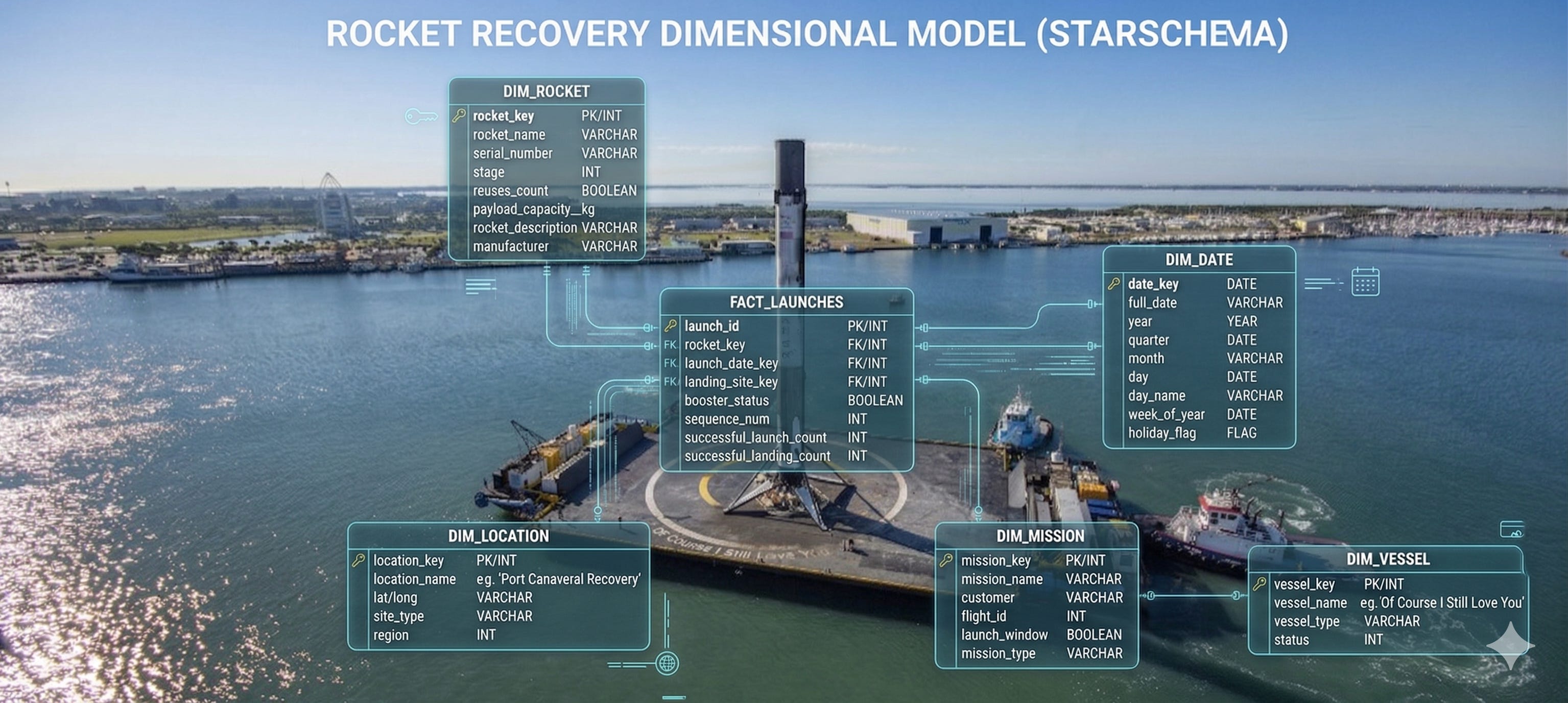
If you ever sat in a data interview and heard “walk me through your star schema,” you already know the feeling. You can explain facts and dimensions in theory. But the next question is often: how did you get from a messy source to something people can actually query?
This post is my attempt to bridge that gap without drowning you in slides. We will use real JSON from the public SpaceX API, load it into DuckDB on your laptop, and build a tiny star schema. Then we will play with slowly changing dimensions (SCD) — Type 1, 2, and 3 — because interviewers still love that topic, and because it is one of those ideas that only clicks when you run the SQL yourself.
If you didn’t try DuckDB yet, check our lesson Just enough DuckDB for Data Analyst | Module 2.7
No cloud account required. Just DuckDB and a network connection for the first fetch.
Why bother with dimensional modelling?
Here is the honest version. Not every team models everything as a star schema. You will see wide tables, one big denormalized export, or a lakehouse with a dozen patterns at once. Fair enough.
But dimensional modelling is still the language a lot of BI tools, metrics layers, and hiring loops speak. When it fits, it fits well: you separate what happened (facts) from what we call things (dimensions), you pick a clear grain, and you stop arguing about whether “one row” means a launch or half a launch.
In practice you usually end up with:
Fact tables — events or measurements (one row per launch, one row per order line)
Dimension tables — descriptions you join to facts (date, rocket, customer)
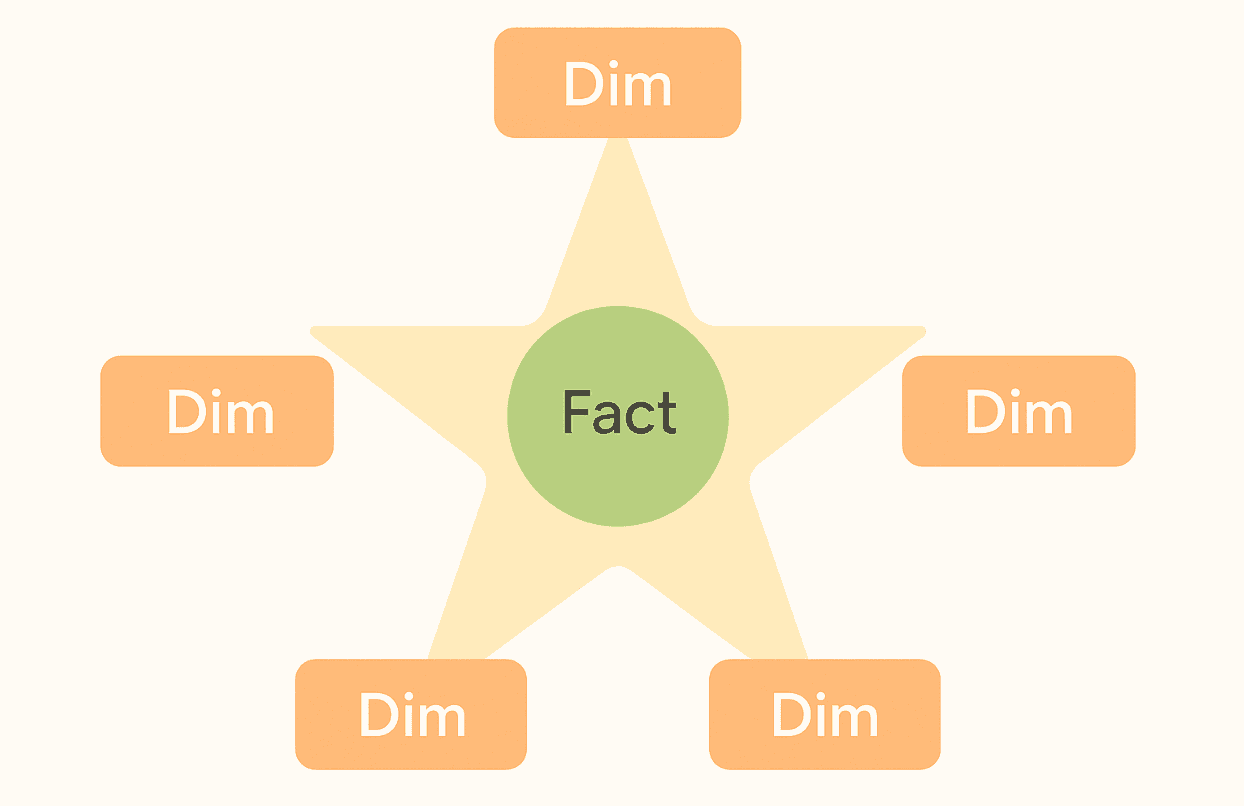
A simple star schema — fact in the middle, dimensions around it — covers a large share of reporting work. It also shows up in interviews next to grain, keys, and SCDs. This post is not a promise that stars solve every problem. It is a practical default you can explain, sketch on a whiteboard, and back up with a file on disk.
A minute of history, then the words that matter
History in one breath: a lot of what people mean by “dimensional modelling” comes from Ralph Kimball and the books around The Data Warehouse Toolkit.
The pitch was simple: make tables that business people can name, and joins that analysts can repeat without a map of fifty normalized tables.
You will still meet Inmon-style warehouses and hybrid setups. That is fine. In many analytics shops, Kimball-style stars stayed popular because they match how reporting tools think.
Definitions (keep this table nearby; it saves you in interviews):
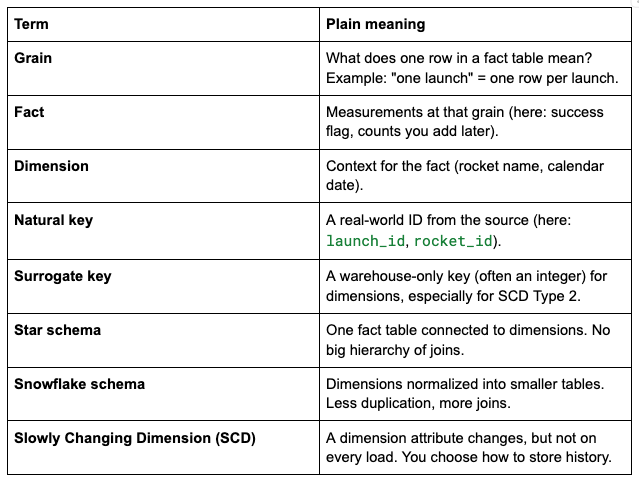
If you remember only one line for the room: grain first. Everything else gets easier after that.
From “what do we want to know?” to DDL
You do not need a perfect methodology. You need a repeatable path. This is the one I still use when I start from zero.
1) Business questions
Before you name tables, write questions in plain language. Five is enough. Ten is great.
Example:
How many launches per month?
What is the success rate by rocket name?
Which rocket flew most often in this sample?
If you cannot phrase the questions, your grain is probably fuzzy. That is a feature, not a bug — fix it early.
2) Bus matrix (simple version)
A bus matrix is a small grid: facts (business processes) on one axis, dimensions on the other. It looks almost too simple. It is still useful because it forces you to ask: what do we measure, and what describes it?

If you add more facts later (payload, booster reuse, whatever), the win is conformed dimensions: the same dim_date, the same dim_rocket, reused across facts. That is how analytics stops turning into twenty different definitions of “rocket.”
3) Logical design (entities, relationships, attributes)
This is the step people often skip in blog posts. They jump from questions to dim_ / fct_ tables. That works if you already think in stars. If you do not, add one short logical pass so the physical names are not magic.
What “logical” means here: you agree on what exists in the business, how things connect, and what belongs on the fact row — still on paper or a whiteboard. You can stay away from SQL types, indexes, and VARCHAR(200) for a moment.
Grain (again, on purpose): one row = one launch attempt (one mission event in our sample).
Entities:
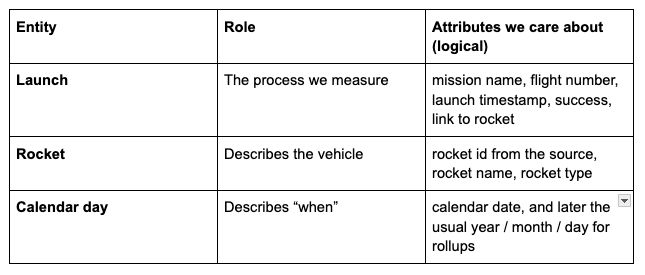
Relationships (plain language):
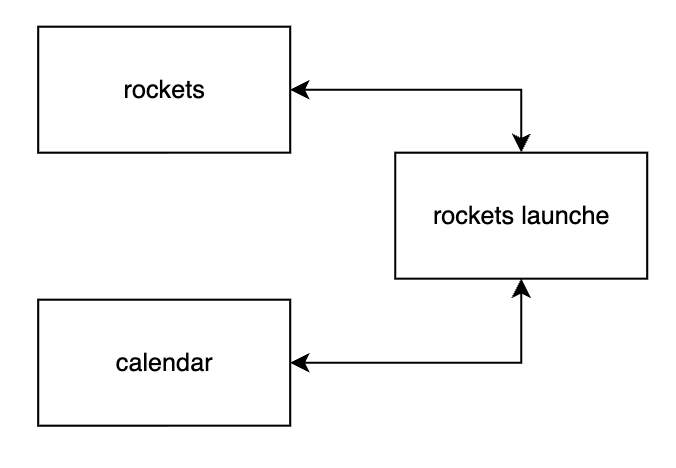
Each launch happens on one calendar day and uses one rocket.
Many launches can share the same rocket. That is a many-to-one from launch → rocket, and launch → date.
Tiny picture of the join path (star):
4) Physical model (DDL)
Now you map the logical picture to warehouse tables:
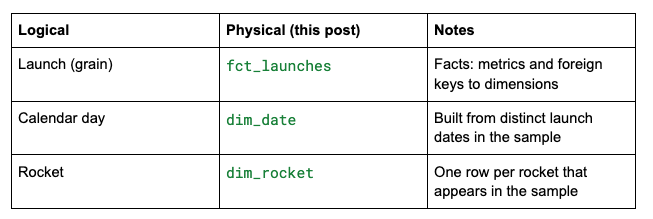
Naming is a convention: fct_ for facts, dim_ for dimensions. The important part is that everyone on the team reads the same diagram.
At some point the whiteboard has to become SQL. Below we use DuckDB and a local database file so you can poke at the data without spinning up a warehouse.
DuckDB: fetch launches like you mean it
I like DuckDB for posts like this because the feedback loop is fast. You run SQL, you see rows, you fix your mistake, you move on.
Install DuckDB (CLI is enough). From this folder, create a small database and load 20 recent launches with the helper script.
Create the new file fetch_launches.sql:
-- SpaceX public API (community-maintained). Requires network.
-- Run from this folder:
--   duckdb spacex_modelling.duckdb < fetch_launches.sql

INSTALL httpfs;
LOAD httpfs;

-- Remote JSON can change between HTTP reads; DuckDB may error on ETag mismatch.
SET unsafe_disable_etag_checks = true;

DROP TABLE IF EXISTS stg_launches;

CREATE TABLE stg_launches AS
WITH l AS (
    SELECT *
    FROM read_json_auto('https://api.spacexdata.com/v4/launches')
),
r AS (
    SELECT *
    FROM read_json_auto('https://api.spacexdata.com/v4/rockets')
)
SELECT
    l.id AS launch_id,
    l.flight_number,
    l.name AS mission_name,
    CAST(l.date_utc AS TIMESTAMP) AS launch_ts,
    CAST(CAST(l.date_utc AS TIMESTAMP) AS DATE) AS launch_date,
    l.success AS launch_success,
    l.rocket AS rocket_id,
    r.name AS rocket_name,
    r.type AS rocket_type
FROM l
INNER JOIN r ON l.rocket = r.id
WHERE l.date_utc IS NOT NULL
ORDER BY launch_ts DESC
LIMIT 20;

SELECT 'stg_launches rows' AS check_name, COUNT(*) AS n FROM stg_launches;
Learn more about SpaceX API and available data at
https://docs.spacexdata.com/#intro
What fetch_launches.sql does under the hood:
Loads the httpfs extension so DuckDB can read remote URLs.
Pulls launches and rockets as JSON from the SpaceX API.
Joins them and keeps the 20 most recent launches that have a date.
Run it:
duckdb spacex_modelling.duckdb < fetch_launches.sql

┌───────────────────┬───────┐
│    check_name     │   n   │
│      varchar      │ int64 │
├───────────────────┼───────┤
│ stg_launches rows │  20   │
└───────────────────┴───────┘
Why SpaceX? The data is small, relatable, and a bit fun. Rockets beat generic “customer_id” examples when your brain is already tired after a long day.
Reality check: the API is public and community-maintained. Data can shift. On top of that, DuckDB may complain about ETag changes when it reads the same URL twice. The script sets unsafe_disable_etag_checks = true so you can focus on modelling instead of HTTP trivia. If you want stricter behaviour later, read the DuckDB docs for httpfs and decide what fits your pipeline.
Build the star schema (SQL)
Open the database:
duckdb spacex_modelling.duckdbWe can quickly observe the data with simple SQL SELECT * FROM stg_launches LIMIT 10;
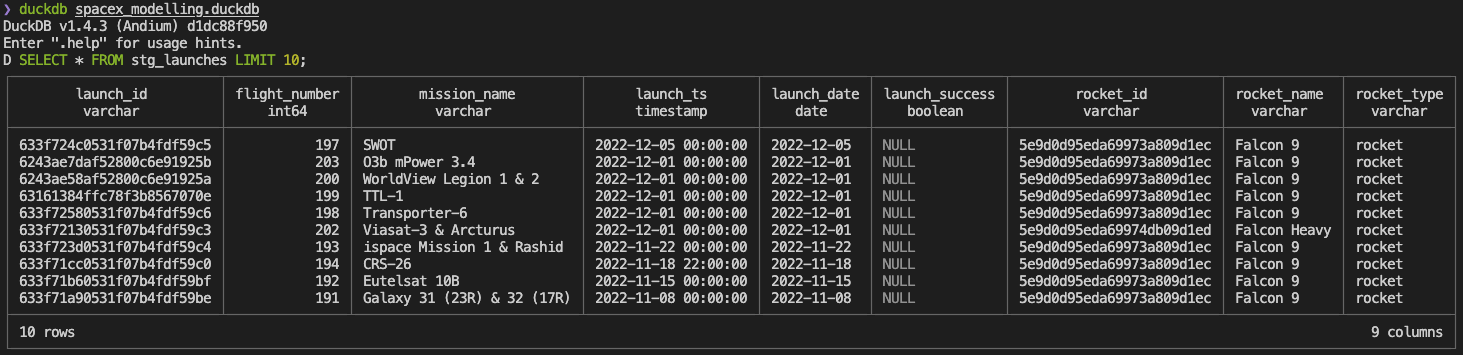
Let’s create our dimensions and facts to help us answer business questions. Run:
-- Calendar dimension from the launch dates in the sample
CREATE OR REPLACE TABLE dim_date AS
SELECT DISTINCT
    CAST(strftime(launch_date, '%Y%m%d') AS INTEGER) AS date_key,
    launch_date AS full_date,
    year(launch_date) AS year_nbr,
    month(launch_date) AS month_nbr,
    day(launch_date) AS day_of_month
FROM stg_launches;

-- One row per rocket (in this sample)
CREATE OR REPLACE TABLE dim_rocket AS
SELECT DISTINCT
    rocket_id,
    rocket_name,
    rocket_type
FROM stg_launches;

-- Fact: one row per launch
CREATE OR REPLACE TABLE fct_launches AS
SELECT
    s.launch_id,
    s.flight_number,
    s.mission_name,
    CAST(strftime(s.launch_date, '%Y%m%d') AS INTEGER) AS date_key,
    s.rocket_id,
    CAST(COALESCE(s.launch_success, FALSE) AS INTEGER) AS success_flag
FROM stg_launches s;
At this point, you have something you can show: a fact table with keys, dimensions you can join, and a date table that makes time rollups boring in a good way.
Sanity-check queries (they also feel good in a portfolio walkthrough):
-- Launches per month in this 20-row sample
SELECT d.year_nbr, d.month_nbr, COUNT(*) AS launches
FROM fct_launches f
JOIN dim_date d ON f.date_key = d.date_key
GROUP BY 1, 2
ORDER BY 1, 2;

-- Success rate by rocket name
SELECT r.rocket_name,
       SUM(f.success_flag) AS successes,
       COUNT(*) AS launches
FROM fct_launches f
JOIN dim_rocket r ON f.rocket_id = r.rocket_id
GROUP BY 1
ORDER BY launches DESC;
SCD: the part where dimensions refuse to sit still
Facts are jealous of attention, but dimensions do the quiet damage. A rocket name in a catalogue can change. A product category can move. A customer tier can be renamed for marketing reasons.
The API gives you today’s label. In a real warehouse, you often need a policy: do we overwrite, do we keep history, do we keep one “previous” value?
We will use one rocket as the story — Falcon 9 in the API — because it shows up in the sample, and everyone recognizes the name.
Falcon 9 id in the SpaceX API (stable id):
5e9d0d95eda69973a809d1ec
Imagine the business renames the rocket from Falcon 9 to Falcon 9 Block 5 on 2026-03-25. The launch facts do not move. Only the dimension does. That is the whole point of SCD: the fact table stayed true when the launch happened. The label is a separate problem.
SCD Type 1 — overwrite
Idea: one row per rocket. New value replaces the old value. History is lost. Fast, simple, and sometimes exactly what the business wants (“we only care what it says now”).
CREATE OR REPLACE TABLE dim_rocket_scd1 AS
SELECT * FROM dim_rocket;

UPDATE dim_rocket_scd1
SET rocket_name = 'Falcon 9 Block 5'
WHERE rocket_id = '5e9d0d95eda69973a809d1ec';
Interview line: “Type 1 is good when the business only cares about the current label.”
SCD Type 2 — full history
Idea: multiple rows for the same natural key (rocket_id). You track valid_from, valid_to, and is_current (or equivalent). Facts join to the version that matches the launch date.
This is the pattern people draw on the whiteboard when someone says “as-of reporting.”
CREATE OR REPLACE TABLE dim_rocket_scd2 (
    rocket_sk BIGINT PRIMARY KEY,
    rocket_id VARCHAR NOT NULL,
    rocket_name VARCHAR NOT NULL,
    rocket_type VARCHAR,
    valid_from DATE NOT NULL,
    valid_to DATE NOT NULL,
    is_current BOOLEAN NOT NULL
);

INSERT INTO dim_rocket_scd2
SELECT
    ROW_NUMBER() OVER (ORDER BY rocket_id) AS rocket_sk,
    rocket_id,
    rocket_name,
    rocket_type,
    DATE '2010-01-01' AS valid_from,
    DATE '9999-12-31' AS valid_to,
    TRUE AS is_current
FROM dim_rocket;

-- Close the old row and open a new version for the rename
UPDATE dim_rocket_scd2
SET valid_to = DATE '2026-03-24', is_current = FALSE
WHERE rocket_id = '5e9d0d95eda69973a809d1ec'
  AND is_current = TRUE;

INSERT INTO dim_rocket_scd2 (rocket_sk, rocket_id, rocket_name, rocket_type, valid_from, valid_to, is_current)
SELECT
    COALESCE((SELECT MAX(rocket_sk) FROM dim_rocket_scd2), 0) + 1,
    '5e9d0d95eda69973a809d1ec',
    'Falcon 9 Block 5',
    rocket_type,
    DATE '2026-03-25',
    DATE '9999-12-31',
    TRUE
FROM dim_rocket
WHERE rocket_id = '5e9d0d95eda69973a809d1ec'
LIMIT 1;
Interview line: “Type 2 is the default answer when you must report as-of history.”
SCD Type 3 — current + previous columns
Idea: keep one row per dimension key, add previous and current columns. You only store one step of history. That sounds limited — it is — but it is easy to explain and sometimes enough for a dashboard footnote (“what did we call it last quarter?”).
CREATE OR REPLACE TABLE dim_rocket_scd3 (
    rocket_id VARCHAR PRIMARY KEY,
    rocket_name_current VARCHAR NOT NULL,
    rocket_name_previous VARCHAR,
    name_change_effective_date DATE
);

INSERT INTO dim_rocket_scd3
SELECT
    rocket_id,
    rocket_name,
    NULL,
    NULL
FROM dim_rocket;

UPDATE dim_rocket_scd3
SET rocket_name_previous = rocket_name_current,
    rocket_name_current = 'Falcon 9 Block 5',
    name_change_effective_date = DATE '2026-03-25'
WHERE rocket_id = '5e9d0d95eda69973a809d1ec';
Interview line: “Type 3 is rare. It is useful when you only need one prior value, not full history.”
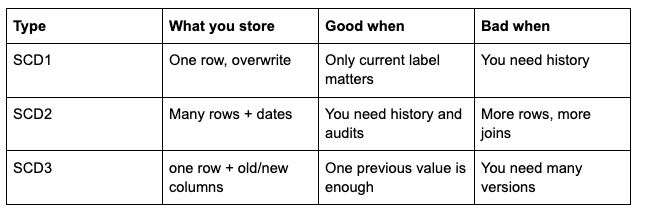
Quick comparison
What I hope you take away
Start from questions and grain. If that part is clear, the rest is mostly typing.
A bus matrix is a small tool that saves you from building twelve different “rocket” concepts.
Logical design (entities, relationships, attributes) is the bridge between the matrix and dim_ / fct_. Skip it only when the team already shares the same picture.
DuckDB + httpfs is a nice way to pull JSON from an API and get back to SQL fast.
SCD is not magic. It is a policy for how dimension changes meet historical facts — Type 1, 2, and 3 are the usual interview set for a reason.
If you run the scripts in this post, you will have more than slides. You will have a file you can open, query, and break on purpose. That is still one of the best ways to learn.
Resources
SpaceX API — community API for the data we use.
DuckDB httpfs — reading remote files.
The Data Warehouse Toolkit — Ralph Kimball and Margy Ross — a deeper reference on dimensional modelling.