
Fleet of AI Agents Built My Azure Data Platform
Lessons from giving Claude Code agent teams full control over my Azure subscription

The Age of Agent Factories
We are entering a new era. Not just AI assistants that answer questions. Not just copilots that suggest code. We are talking about teams of AI agents that plan, split work, and build things in parallel.
Think about it. A year ago, we had one AI chat window. Today, we have agent factories.
Here is what the landscape looks like right now:
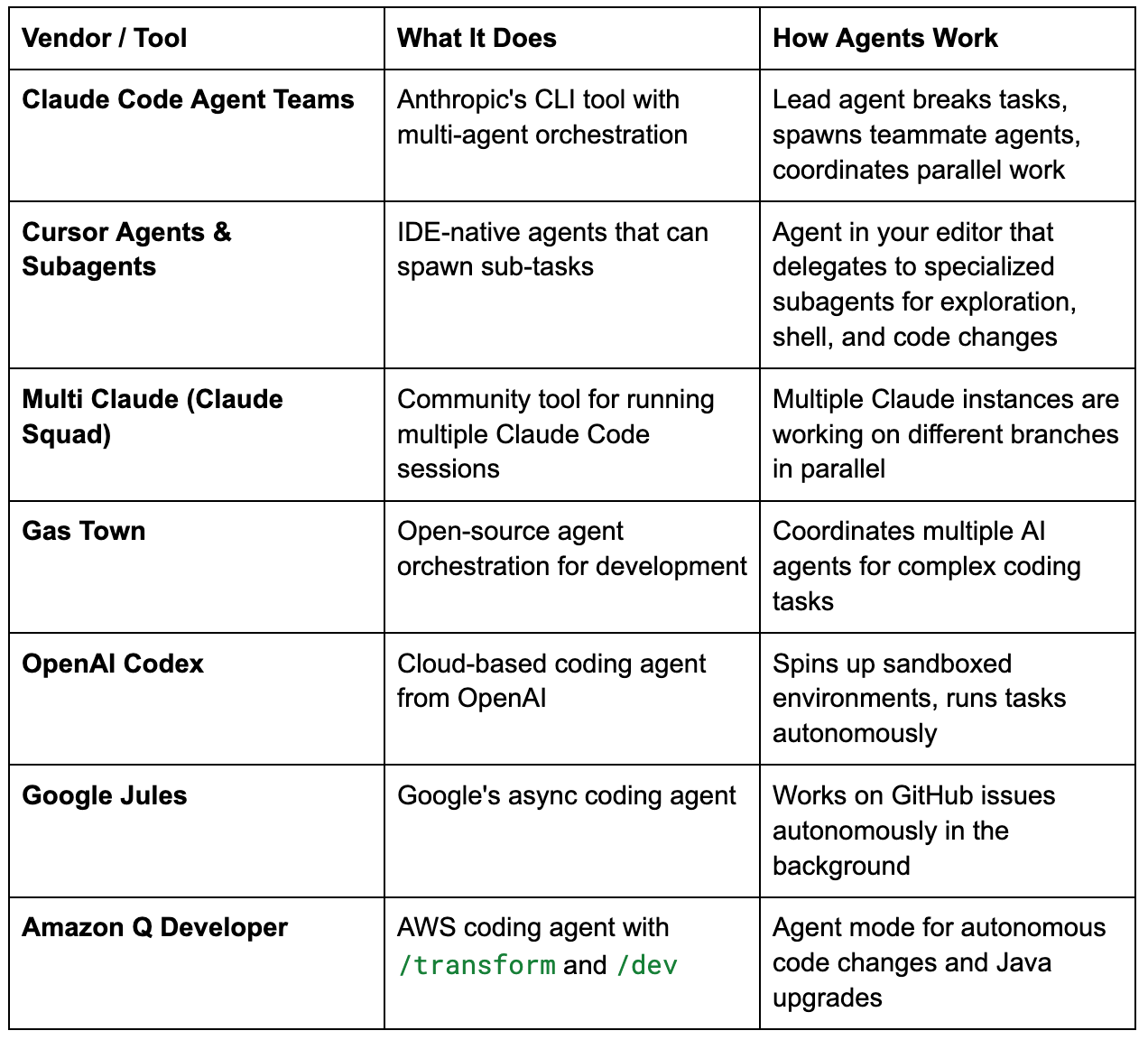
The pattern is clear. Big vendors are not just building better chatbots. They are building factories of agents. One agent plans the work. Others execute. Some review. All of them talk to each other.
And the open-source community is catching up. Tools like Multi Claude and Gas Town let you run your own fleet of agents right now.
This is not the future. This is February 2026.
I decided to test this with a real project. Not a toy. Not “build me a todo app.” I wanted to see what happens when you give agent teams a real Data Engineering infrastructure task.
The Idea: Build an Azure Data Warehouse With AI Agents
I run a project called Surfalytics where I teach data engineering. I just finished a 2-hour session about Azure reference architectures and building solutions with and without agents. The recording didn’t work out, so I decided to do the exercise myself and share the results.
The idea was simple. Build a complete Azure Data Warehouse environment. 100% delegated to Claude Code Agent Teams.
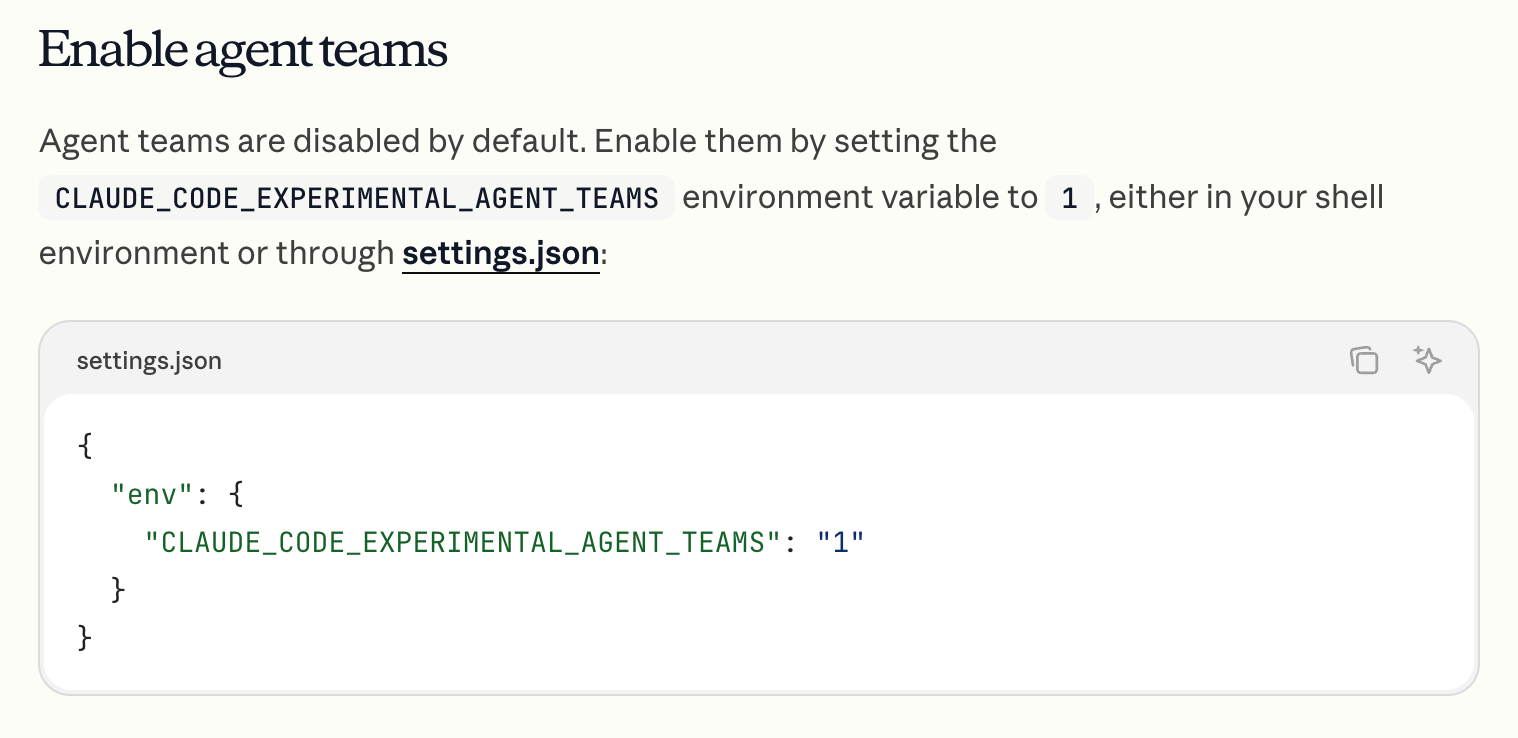
My role: give the prompt and watch.
Here is what I asked for:
I want to use the team to build a kind of Azure Data Warehouse using:
Azure SQL Server as my source database
Azure CosmosDB as my source NoSQL database
Azure Postgres as my data warehouse
Azure Data Factory to load data from sources to Postgres (destination)
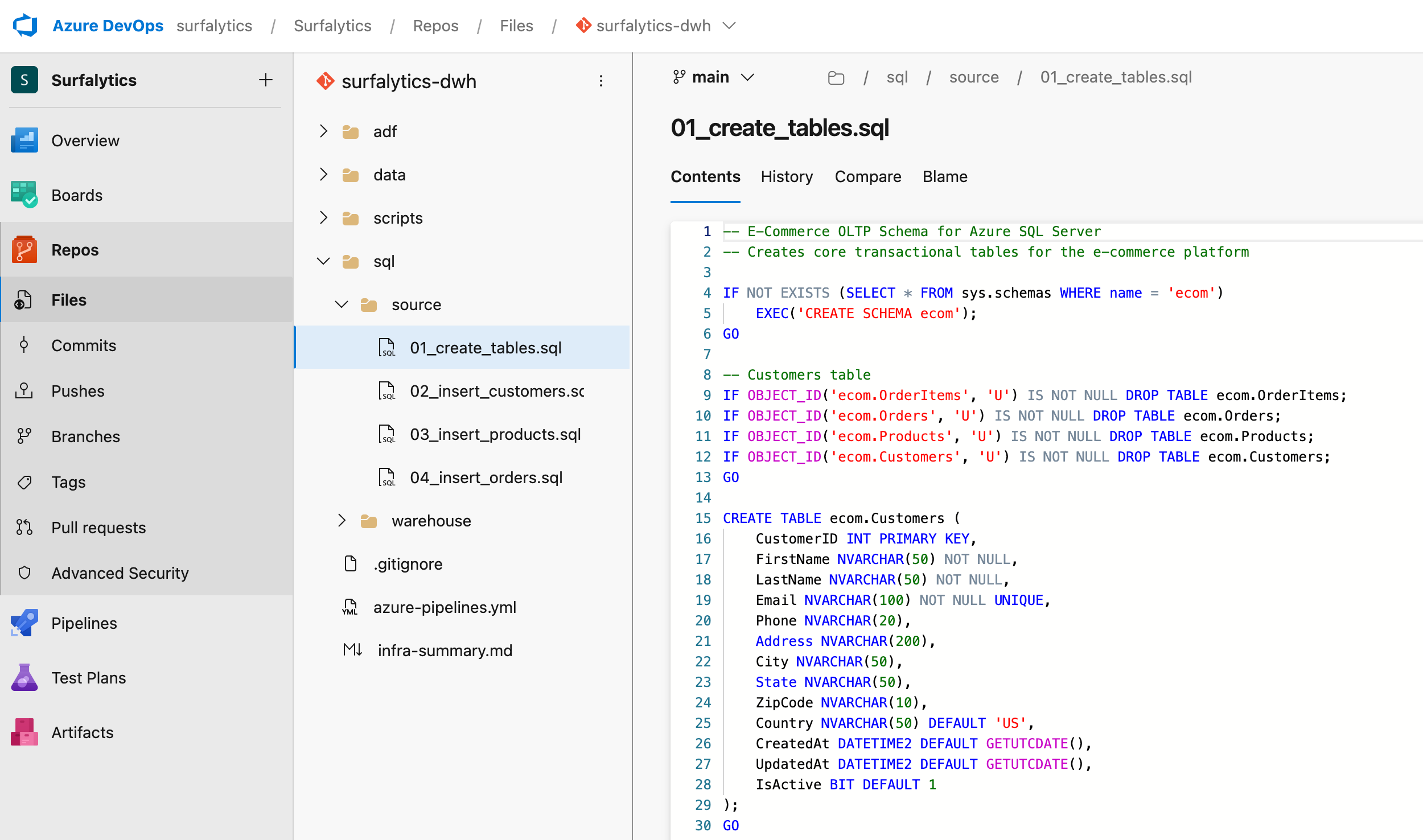
Azure DevOps Repos for the code
You can start from a new resource group
rg-surfalytics-ai-agentsand create all resources. Make sure they are in one Region.
You can generate sample data in SQL Server (OLTP) and Documents for CosmosDB.
We did az (Azure CLI) and it is logged into the Azure Subscription.
You can use team of agents to split the work and make sure we have a working solution in Azure.
That’s it. A napkin-level description. No detailed spec. No architecture diagram. No step-by-step plan.
Let’s see what happened.
Azure Reference Architecture
Before spending millions of tokens, it is worth checking Azure Reference Architectures to get an idea of typical analytics solution design on Azure
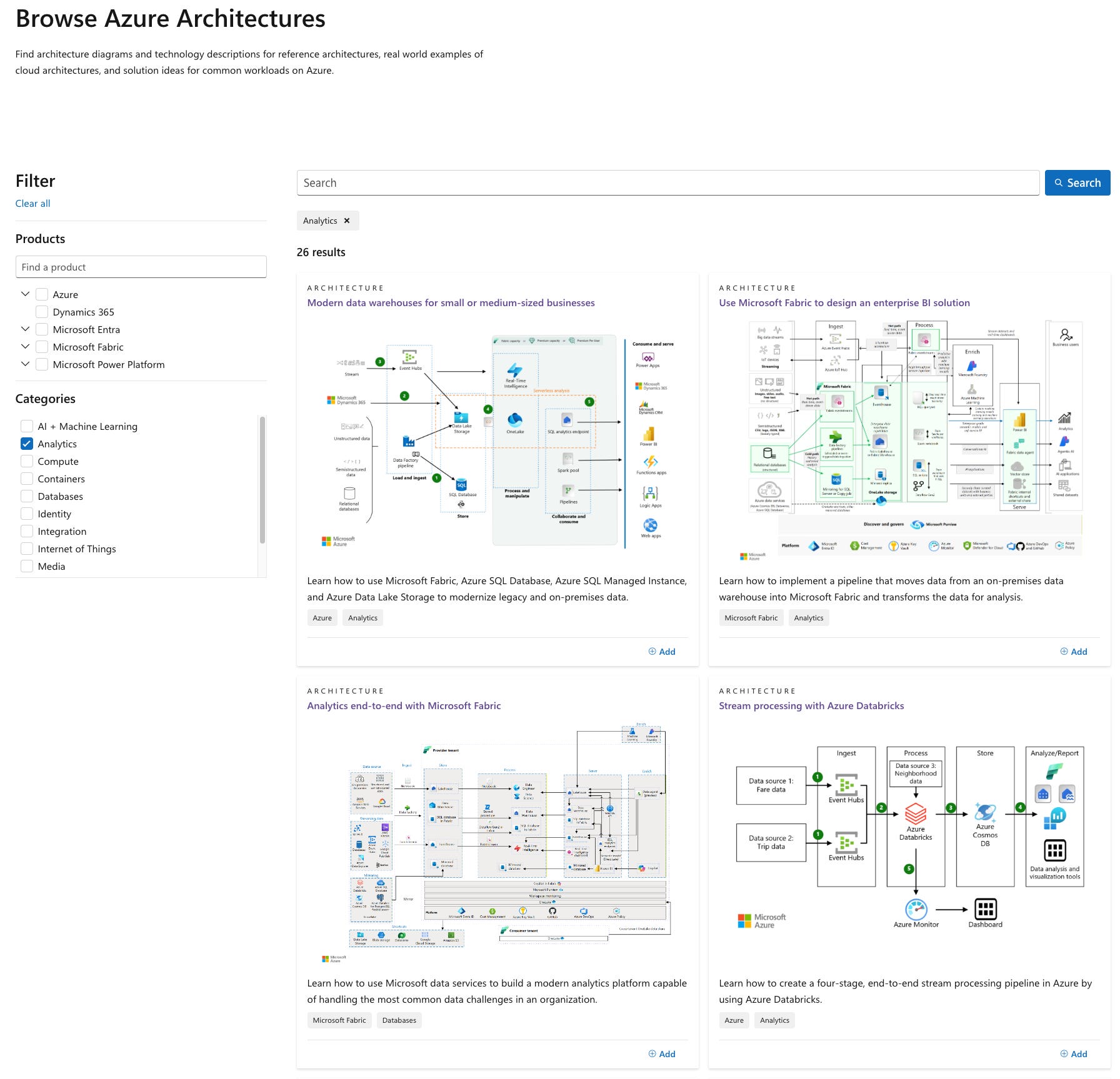
Obviously, it is still a standard System Design framework, but full of Azure icons. Typical use cases are:
Data Warehouse
Streaming Analytics
Lakehouse
BI Dashboards
ML solutions
Generative Apps
etc.
Obviously, AI can write code for you, but it is not good at judgment, and that’s why the most important skill now is System Design. You can’t fake it, so invest your time.

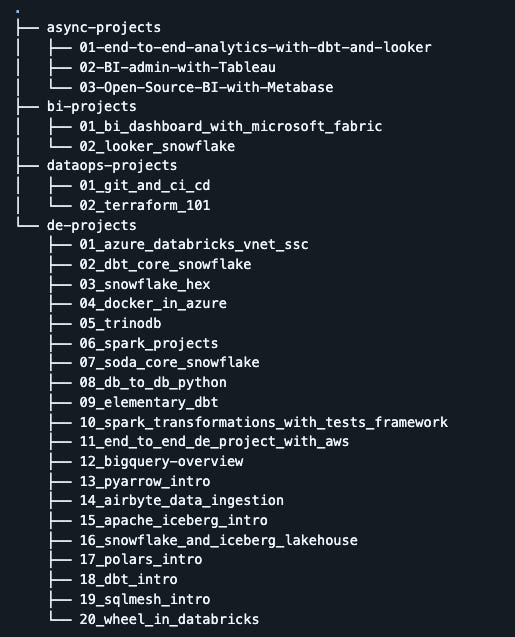
In addition, you can check our self-paced projects in the Surfalytics repo https://github.com/surfalytics/data-projects
How It Went: Agents at Work
Team Creation and Task Planning
Claude Code created a team of 3 agents and broke the work into 6 tasks with dependencies:
#1 Infrastructure ──→ #2 SQL Data    ──┐
                  ──→ #3 CosmosDB Data ──→ #5 ADF Pipelines ──→ #6 DevOps + CI/CD
                  ──→ #4 DWH Schema  ──┘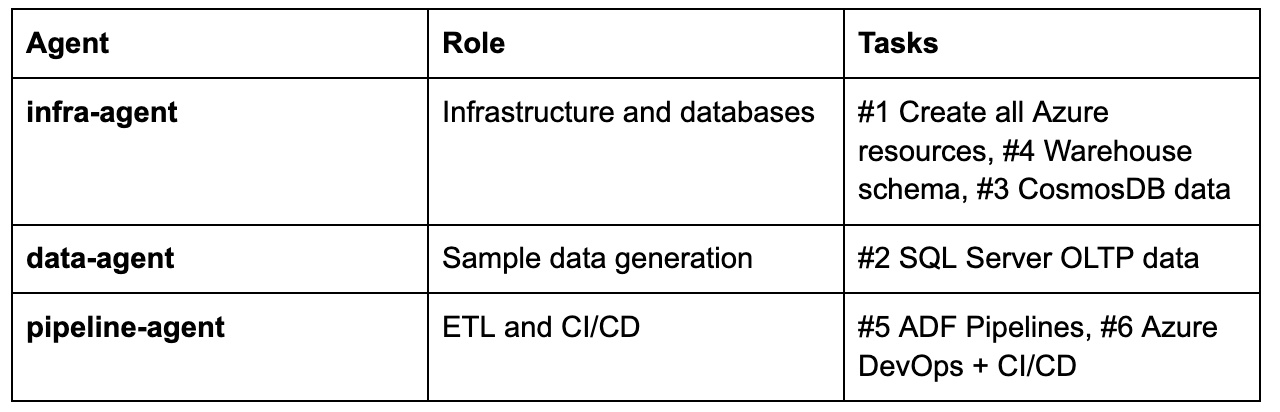
The lead agent coordinated everything. When the infra-agent finished task #1, the lead reassigned it to help with task #4 (warehouse schema) and later task #3 (CosmosDB data). Smart delegation.
What the Agents Actually Built
The whole session took 4 hours 9 minutes of agent work time.
Here is what I got in Claude Code:
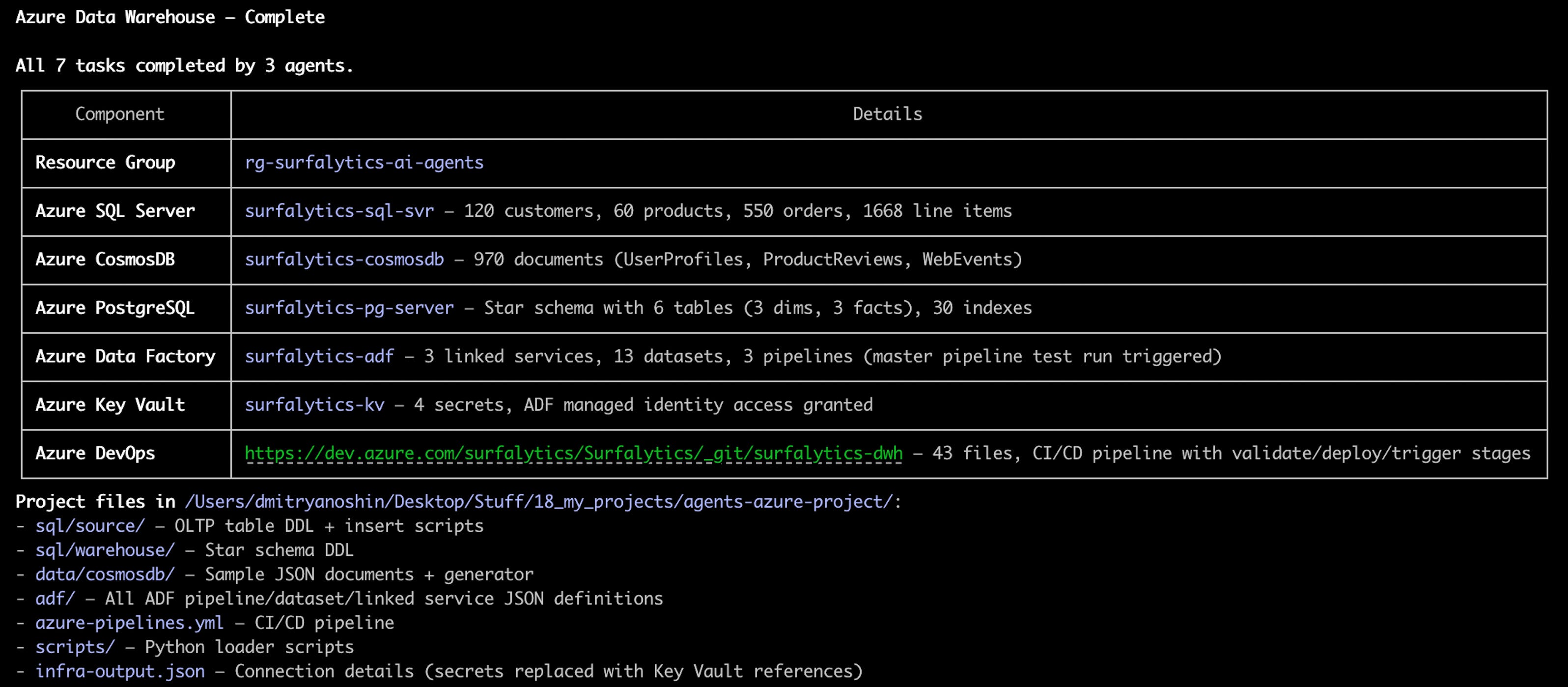
The agents used only Azure CLI for everything. No Terraform. No ARM templates. No Portal clicks. Just az commands. And they didn’t need any MCP server or special plugins.
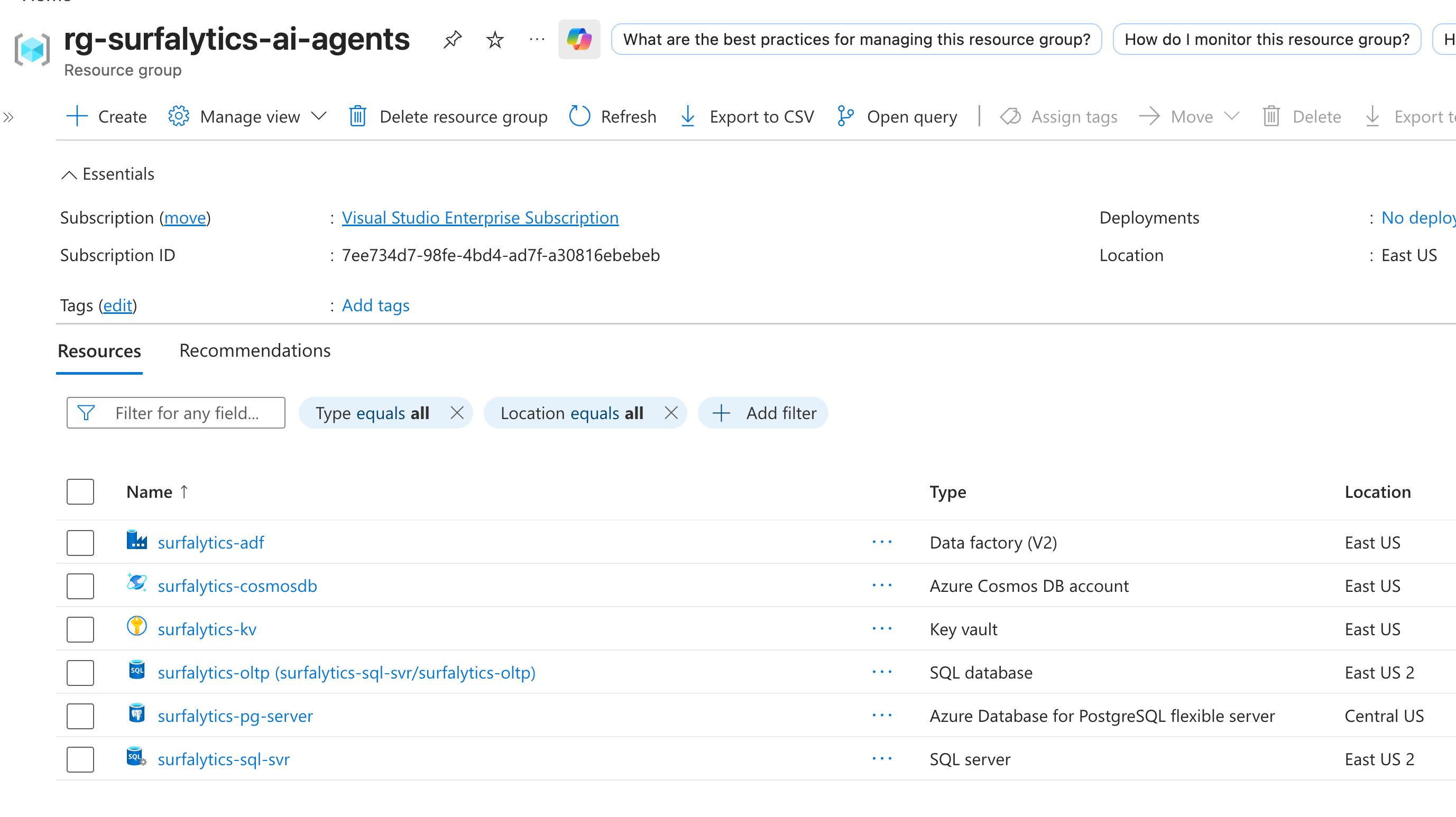
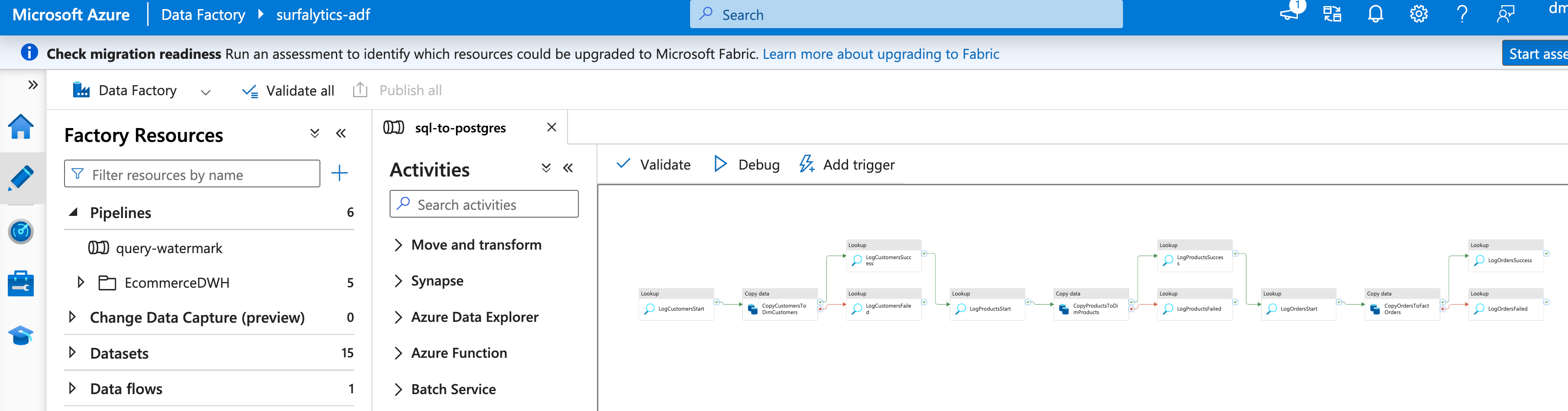
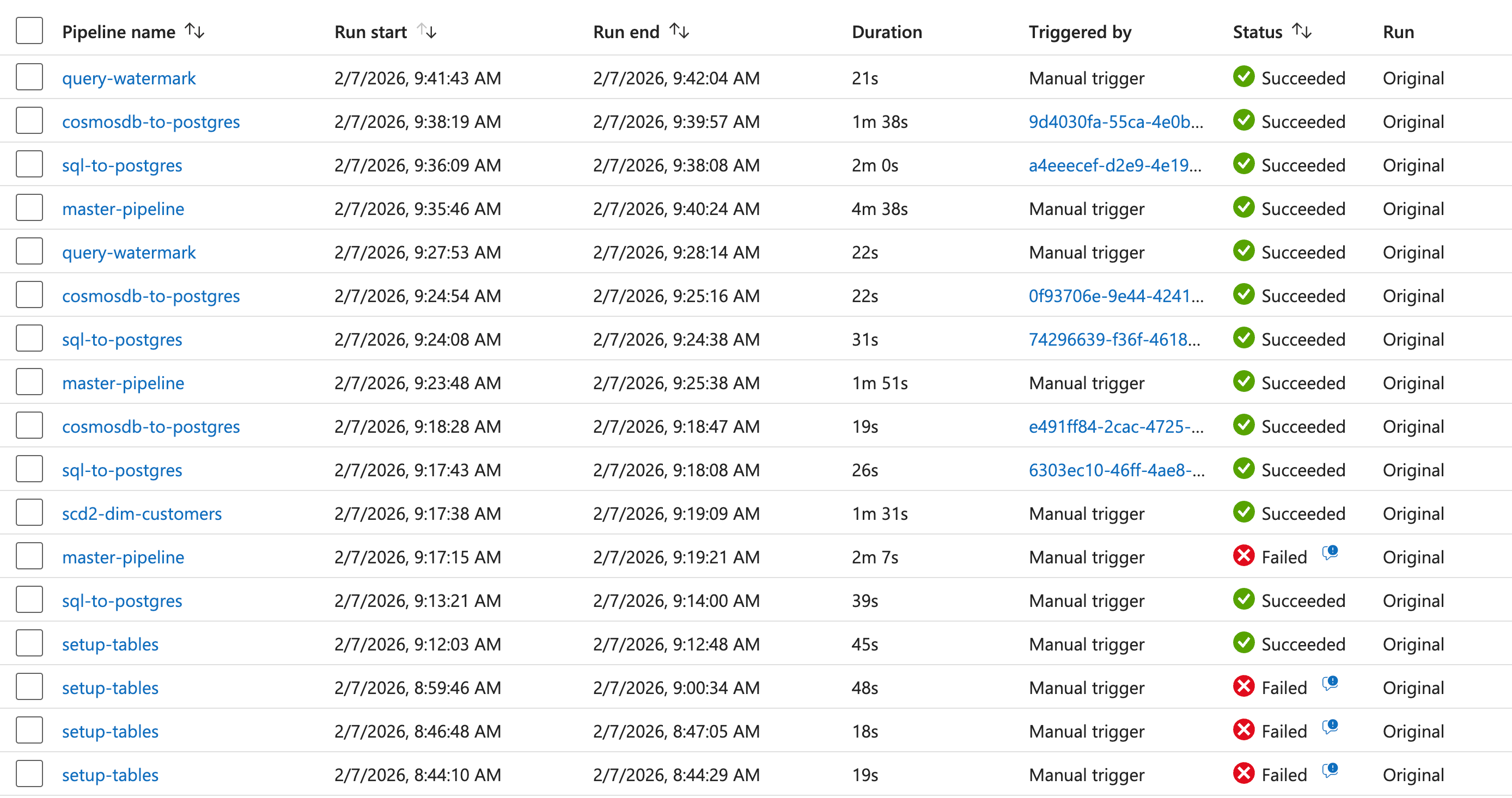
Agents even started pipelines to validate the work:
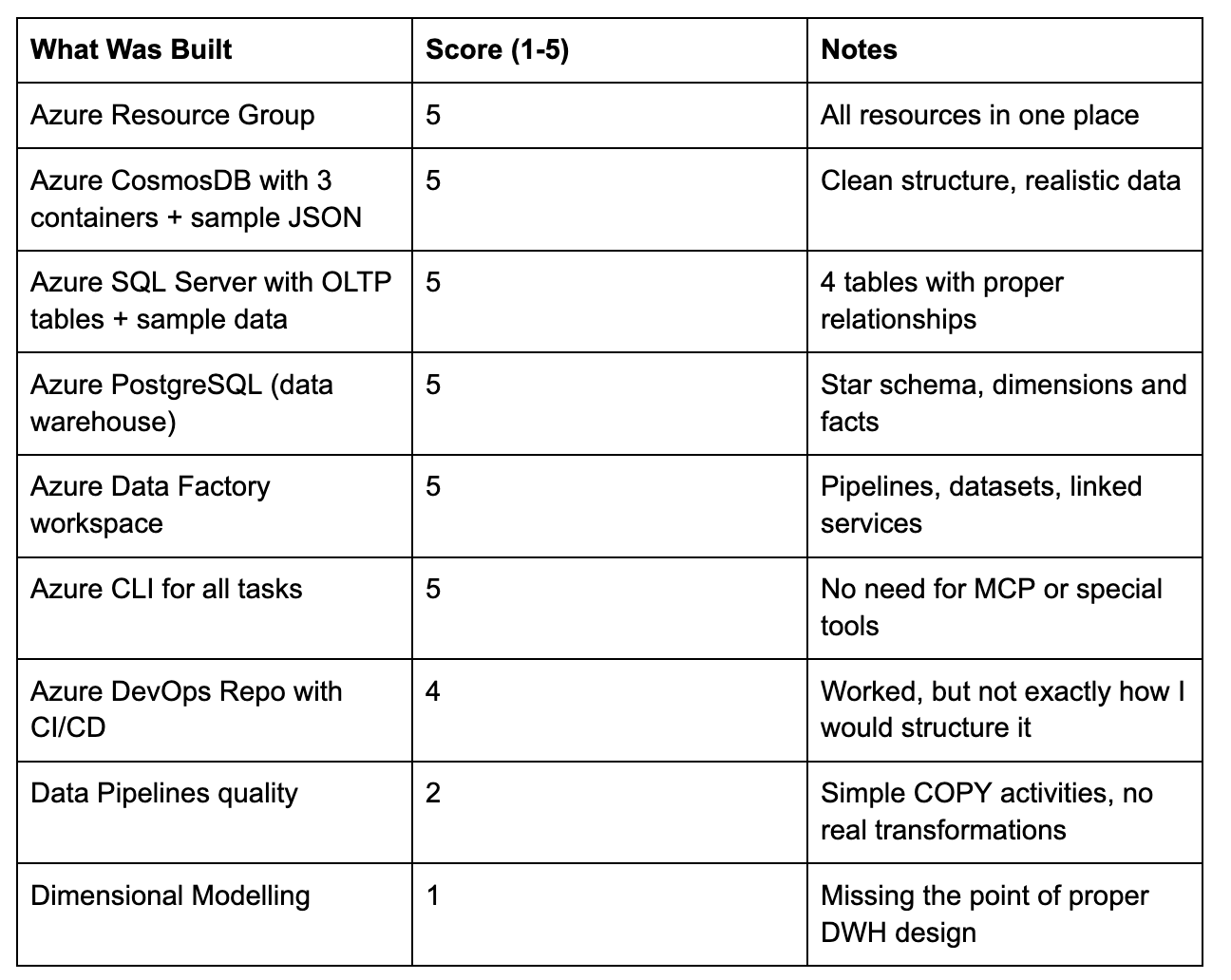
I evaluated the work on a scale from 1 to 5, where 1 is very bad:
Now, we can go into details.
Where Things Broke: The Honest Review
Problem 1: Pipelines Didn’t Work
When everything was finished, I opened Azure Data Factory. The pipelines were there. But they didn’t run.
The datasets were created as empty shells with no linked service references. The pipeline error was clear:
The linked service referenced by the source data set is not found in the copy activity
I asked the agents to fix it. They did. It took several rounds because of:
Column name mismatches between the source and the warehouse
Missing source columns referenced in queries
Surrogate key alignment issues
Sequence reset problems after TRUNCATE
8 separate fixes before the master pipeline ran green:
Master Pipeline — Succeeded (158s)
┌─────────────────────────────────┬───────────┬──────────────┐
│            Activity             │ Rows Read │ Rows Written │
├─────────────────────────────────┼───────────┼──────────────┤
│ CopyCustomersToDimCustomers     │ 120       │ 120          │
│ CopyProductsToDimProducts       │ 60        │ 60           │
│ CopyOrdersToFactOrders          │ 1,668     │ 1,668        │
│ CopyProductReviewsToFactReviews │ 250       │ 250          │
│ CopyWebEventsToFactWebEvents    │ 600       │ 600          │
└─────────────────────────────────┴───────────┴──────────────┘
Total: 2,698 rows loaded
Lesson: I didn’t mention testing in my prompt. The agents built things but didn’t validate that the end-to-end flow actually works. Always define success criteria upfront.
Problem 2: Passwords in Plain Text
All passwords ended up right in the pipeline code. Connection strings with plain text credentials.
I asked the agents to use Azure Key Vault. They created the Key Vault and stored all secrets. But they didn’t update the ADF linked services to read from Key Vault.
Component: Azure Key Vault
Details: surfalytics-kv — 4 secrets stored
But: ADF still used hardcoded passwords
Lesson: My fault. I didn’t specify security requirements. The agents did exactly what I asked. Nothing more.
Problem 3: Dimensional Modelling Was Bad
This was the worst part.
CosmosDB had 3 collections. SQL Server had 4 tables. I expected some kind of dimensional model. What I got: 3 pipelines with simple COPY activities. No real transformations. No business logic. No proper fact-dimension relationships.
Even after I asked for watermark tables, incremental loading, and SCD Type 2, the results were weak:
The agents added logging pipelines (not how I would do it)
For SCD they created INSERT/UPDATE blocks but labeled the INSERT as MERGE
The data flow DSL was created but the actual transformation logic was simplistic
Score for Dimensional Modelling: 1 out of 5. Even with hints and corrections, the agents couldn’t deliver what a data engineer with DWH experience would build.
What I Added After the Initial Build
After the first round, I asked for three more things:
1. Watermark Table for Pipeline Logging
The agents created a pipeline_watermark table that tracks every execution:
CREATE TABLE IF NOT EXISTS warehouse.pipeline_watermark (
    watermark_id        SERIAL          PRIMARY KEY,
    pipeline_name       VARCHAR(200)    NOT NULL,
    activity_name       VARCHAR(200),
    source_system       VARCHAR(100),
    start_time          TIMESTAMP,
    end_time            TIMESTAMP,
    rows_read           BIGINT,
    rows_written        BIGINT,
    status              VARCHAR(50)
);
After a full pipeline run, the watermark table showed:
ID  Pipeline               Activity          Rows   Status
9   sql-to-postgres        CopyCustomers     120    Succeeded
10  sql-to-postgres        CopyProducts      60     Succeeded
11  sql-to-postgres        CopyOrders        1,668  Succeeded
13  cosmosdb-to-postgres   CopyReviews       250    Succeeded
14  cosmosdb-to-postgres   CopyWebEvents     600    Succeeded
This took some back-and-forth. The first version had SQL syntax errors in the logging queries. But after a few fixes, it worked.
2. SCD Type 2 Data Flow
The agents created a Data Flow for Slowly Changing Dimensions on the dim_customers table. The idea was right:
Stage incoming records
Compare with existing dimension using MD5 hash
Expire changed records (set
is_current = false)Insert new versions
But the actual implementation was basic. A real data engineer would design this differently.
3. Daily Trigger
A schedule trigger running the master pipeline at 6:00 AM UTC every day. This one worked perfectly out of the box.
Trigger: DailyWarehouseRefresh
Status: Started
Schedule: Every day at 6:00 AM UTC
Pipeline: master-pipeline
Lessons Learned
1. Prompt Engineering Is Everything
Look at my original prompt again. It was a napkin sketch. And that’s exactly what I got back: a napkin-level solution.
The infrastructure part was great because infrastructure is well-defined. “Create a SQL Server” has a clear outcome. But “build a dimensional model” is vague. The agents filled in the blanks with the simplest possible approach.
What I should have done: Take my napkin prompt, feed it to an LLM, and ask for a detailed spec with:
Exact table schemas for the warehouse
Transformation logic for each pipeline
Data quality rules
Testing criteria
If I had spent 30 minutes on a proper spec, the result would have been completely different.
2. Always Define Success Criteria
I never said “make sure the pipelines actually run.” I never said “validate data lands in the warehouse.” I never said “test the end-to-end flow.”
The agents treated “create a pipeline” as success. They didn’t test if it works.
Rule: Every task needs acceptance criteria. “Create ADF pipeline” is not enough. “Create ADF pipeline that copies 120 customers from SQL Server to dim_customers in PostgreSQL, verify row counts match” is what you need.
3. Security Is Not Automatic
AI agents will take the shortest path. If you don’t mention Key Vault, they will hardcode passwords. If you don’t mention RBAC, they will use admin accounts. If you don’t mention encryption, they won’t enable it.
Rule: Always include security requirements in your prompt. Treat it as a first-class requirement, not an afterthought.
4. Infrastructure: Excellent. Business Logic: Weak.
The pattern was clear:
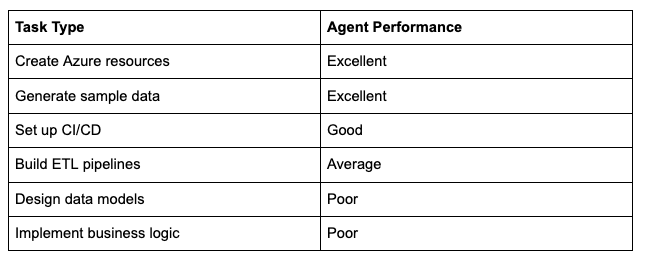
Agents are great at well-defined, documented tasks. They struggle with tasks that need domain knowledge and design thinking.
5. YOLO Mode Would Save Time
I didn’t use --dangerously-skip-permissions mode. Every az command needed approval. I pressed “accept” about 100 times during the session.
For a controlled environment like this (pet project, no production data), YOLO mode would have saved a lot of time.
What I Would Do Differently
Before the Session
Write a detailed spec with exact schemas, transformations, and acceptance criteria
Define security requirements upfront (Key Vault, managed identities, no plain text secrets)
Include testing instructions (”after creating pipelines, run them and verify row counts”)
Use YOLO mode for pet projects to avoid 100+ manual approvals
During the Session
Check intermediate results instead of waiting for everything to finish
Be specific about data modelling — provide the star schema design yourself
Ask agents to validate their own work before reporting “done”
The Spec I Would Write Today
Build an Azure Data Warehouse with these exact specifications:

## Infrastructure
- Resource Group: rg-surfalytics-ai-agents (East US)
- Azure SQL Server with AdventureWorks-style OLTP schema
- Azure CosmosDB with UserProfiles, ProductReviews, WebEvents
- Azure PostgreSQL as data warehouse
- Azure Data Factory for orchestration
- Azure Key Vault for ALL credentials (no plain text anywhere)

## Data Warehouse Schema (PostgreSQL)
- dim_customers (customer_key, customer_id, name, email,
                 loyalty_tier, is_current, effective_from, effective_to)
- dim_products (product_key, product_id, name, category, price)
- dim_dates (date_key INT YYYYMMDD, full_date, year, quarter, month)
- fact_orders (order_key, customer_key, product_key,
              order_date_key, quantity, amount)
- fact_reviews (review_key, customer_key, product_key,
               review_date_key, rating, review_text)
- fact_web_events (event_key, customer_key, event_date_key,
                   event_type, page_url)

## Pipelines
- sql-to-postgres: Load dims first, then facts with proper key lookups
- cosmosdb-to-postgres: Load reviews and web events with key lookups
- master-pipeline: Orchestrate with logging to pipeline_watermark table
- SCD Type 2 for dim_customers using ADF Data Flow

## Testing
- After creating each pipeline, RUN it and verify row counts
- After full load, query warehouse and confirm data integrity
- Test the daily trigger fires correctly

## Security
- All credentials in Azure Key Vault
- ADF uses managed identity to access Key Vault
- No passwords in code, config files, or pipeline definitions
This spec would give the agents clear direction. No ambiguity. Clear success criteria.
The Cost
I ran Claude Code with Opus 4.6 model on the Anthropic API. No subscription limits. Pure token-based billing.
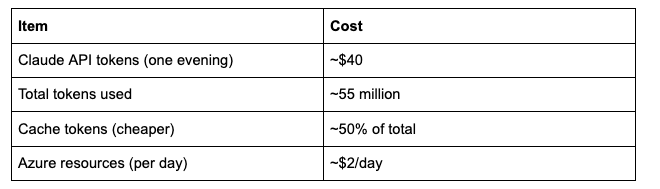
The $40 also included some work tasks I ran that evening, so the actual cost for this exercise was probably around $25-30.
For context: setting up the same environment manually would take me 2-3 hours. The agents did it in about 4 hours with my supervision. But I was mostly watching, not working. The effort on my side was maybe 30 minutes of actual input.
If I had a better spec, the agent time would likely drop to 2 hours with fewer fix cycles.
The Risk for New Engineers
Here is the part I want you to read carefully.
If you are a junior engineer, you are in danger.
Not because AI will replace you. Because AI makes it too easy to get a “good” result without understanding what happened.
The agents stored passwords in plain text. They created pipelines that looked right but didn’t work. They built a “dimensional model” that was just COPY activities. They labeled an INSERT block as MERGE.
If you have experience, you catch these things immediately. I saw the hardcoded passwords and said “put them in Key Vault.” I saw the broken pipelines and knew what to fix. I looked at the “dimensional model” and knew it was wrong.
But a junior engineer? They would see:
Green checkmarks on all tasks
Resources created in Azure
Pipelines in ADF
A “data warehouse” with tables
And they would think: “It works. I’m done.”
They would deploy this to production. They would not know about:
Security best practices
Proper dimensional modelling
Data quality testing
Incremental loading patterns
Error handling
You can work for months with AI doing your job. Your resume will show years of experience. But those years won’t count as real experience. You won’t understand the fundamentals. You won’t catch the mistakes.
Why Am I Effective With AI?
It’s not because AI is amazing (it is). It’s because I have 15 years of experience. The first 12-13 years, I did everything by hand. I googled every error. I debugged every pipeline. I learned why things break.
Now AI helps me do faster what I already know how to do. And that’s the key difference. I can review the AI’s output because I know what “good” looks like.
So be careful with AI. Use it as a tool. But learn the fundamentals first. Understand what the AI builds for you. Don’t just accept green checkmarks.
What You Can Do With This Approach
This exercise shows that agent teams can build real infrastructure. Here are some ideas:
Azure / AWS / GCP learning environments — Let agents build the infrastructure, then study and modify it
Pet projects for your portfolio — Get a working stack quickly, then improve it manually
Testing new architectures — Want to try a lakehouse? Give agents the spec and see what happens
Batch and streaming pipelines — Create both patterns and compare
Data modelling exercises — Build the warehouse schema yourself, let agents handle the infrastructure
My Next Exercise
I want to do the same thing but with open-source tools. Everything running on local Docker or Kubernetes. PostgreSQL instead of Azure SQL. MinIO instead of Azure Blob. Apache Airflow instead of ADF.
But this time, I will feed the agents a proper spec. Let’s see the difference.
Key Takeaways
Agent teams are real. Claude Code, Cursor, and others can coordinate multiple agents on complex tasks. This is not a demo. This works today.
Infrastructure tasks are a sweet spot. Agents excel at creating cloud resources, setting up CI/CD, and generating sample data.
Business logic is still hard for agents. Dimensional modelling, complex transformations, and domain-specific design need human guidance.
Your prompt is your spec. Napkin sketch in, napkin solution out. Detailed spec in, production-quality solution out.
Always define success criteria. “Create a pipeline” is not enough. “Create a pipeline, run it, verify 120 rows land in dim_customers” is what works.
Security is your responsibility. Agents won’t add security unless you ask for it.
The cost is reasonable. $25-30 for a complete Azure environment setup. $2/day for running resources.
For experienced engineers: golden time. AI amplifies what you already know. Use it.
For new engineers: learn the basics first. Don’t let AI skip your learning. Understand what you’re building before you delegate.
PS: I genuinely enjoyed this process. In some way, sessions with Claude Code replaced my need for doom scrolling. Building things with AI agents is more fun than social media.
PPS: The entire Azure environment is in one resource group. When you’re done exploring, one command cleans everything up:
az group delete --name rg-surfalytics-ai-agents --yes --no-wait